Ukraine’s army officials were targeted by a fake charity scam delivering the PluggyApe backdoor. Learn how attackers used WhatsApp and Signal to breach targets.
A sophisticated phishing campaign used fake charity pleas to target Ukraine’s Defense Forces with malware. In late 2025, Russian hackers targeted Ukrainian military officials via WhatsApp and Signal messages masquerading as charity outreach. Unsuspecting recipients were tricked into downloading a malicious backdoor known as PluggyApe, giving the attackers unauthorized access to sensitive systems.
Overview of PluggyApe Malware
PluggyApe is an evil backdoor malware created to secretly take control of compromised machines. The attackers used it in a phishing campaign targeting officials of Ukraine’s Defense Forces between October and December 2025.
In addition to this, researchers linked this campaign to a Russian state-sponsored hacker group referred to as Void Blizzard (also known by the name Laundry Bear). For instance, this group was linked to an attack on the Dutch police in 2024, an incident that involved the theft of sensitive data of police officers.
Targets and Attribution: Russian Hackers Aim at Ukraine’s Defense
It is important to note that the main targets of this attack were individuals associated with the defense sector of Ukraine. Evidently, this indicates that the attack is of an espionage nature because the objective was to obtain military information.
Further, the target of Void Blizzard (Laundry Bear) is also generally confined to NATO member states and other Russian adversaries. This operation may also result in valuable intelligence being acquired by Russia. The PluggyApe operation fits into the wider Russian hacking activity that has been occurring due to the ongoing conflict.
Charity-Themed Social Engineering via Messaging Apps
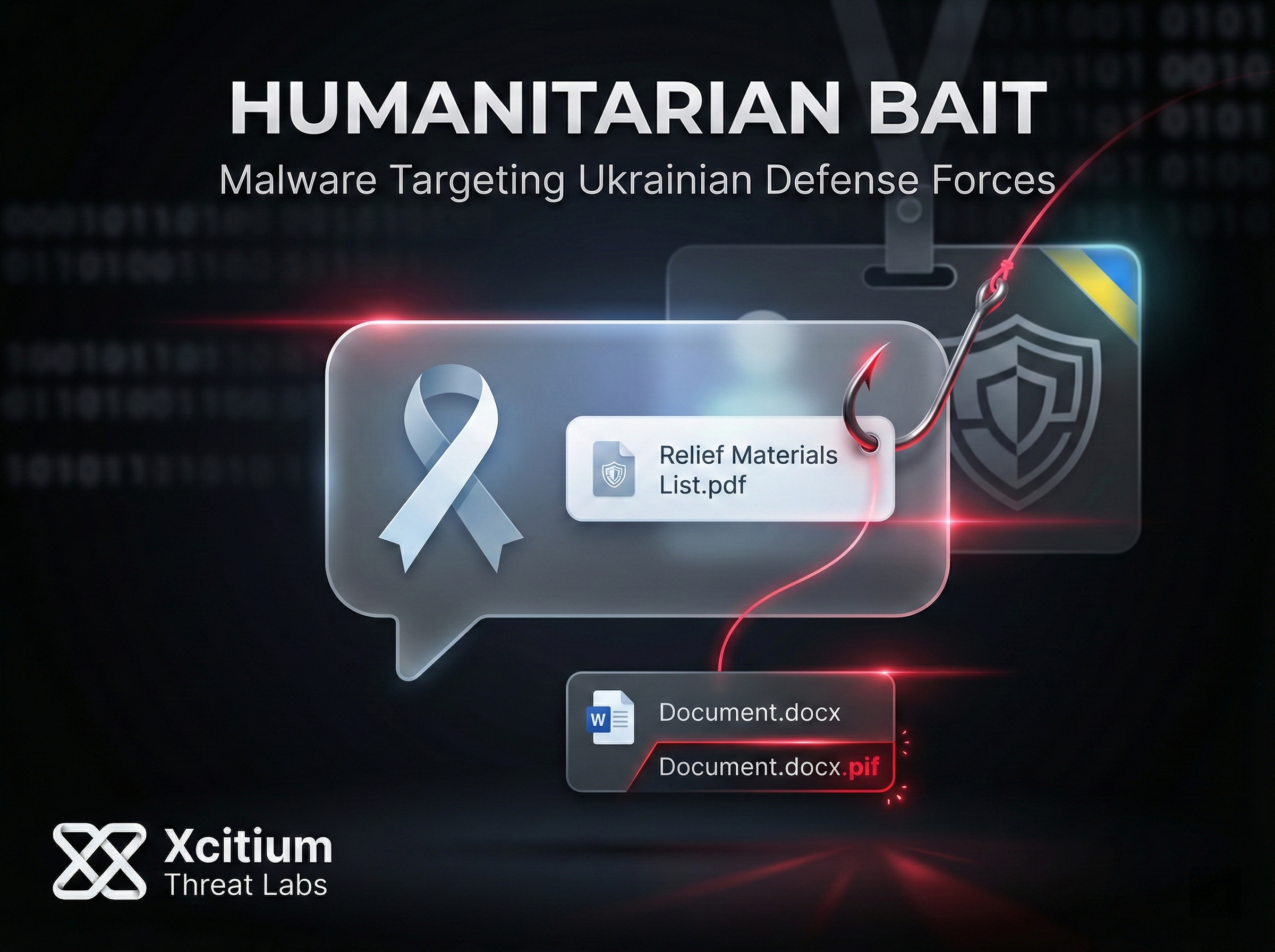
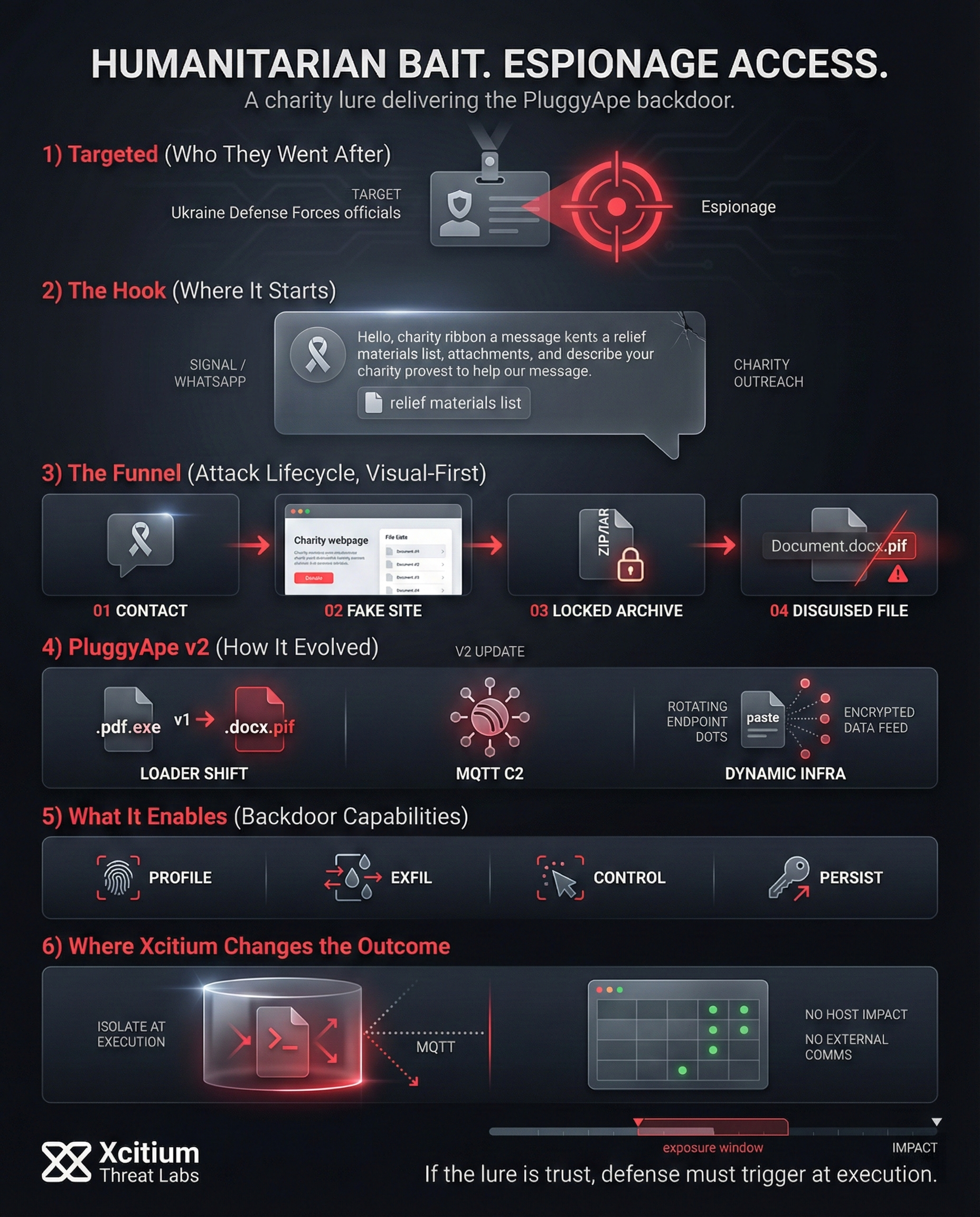
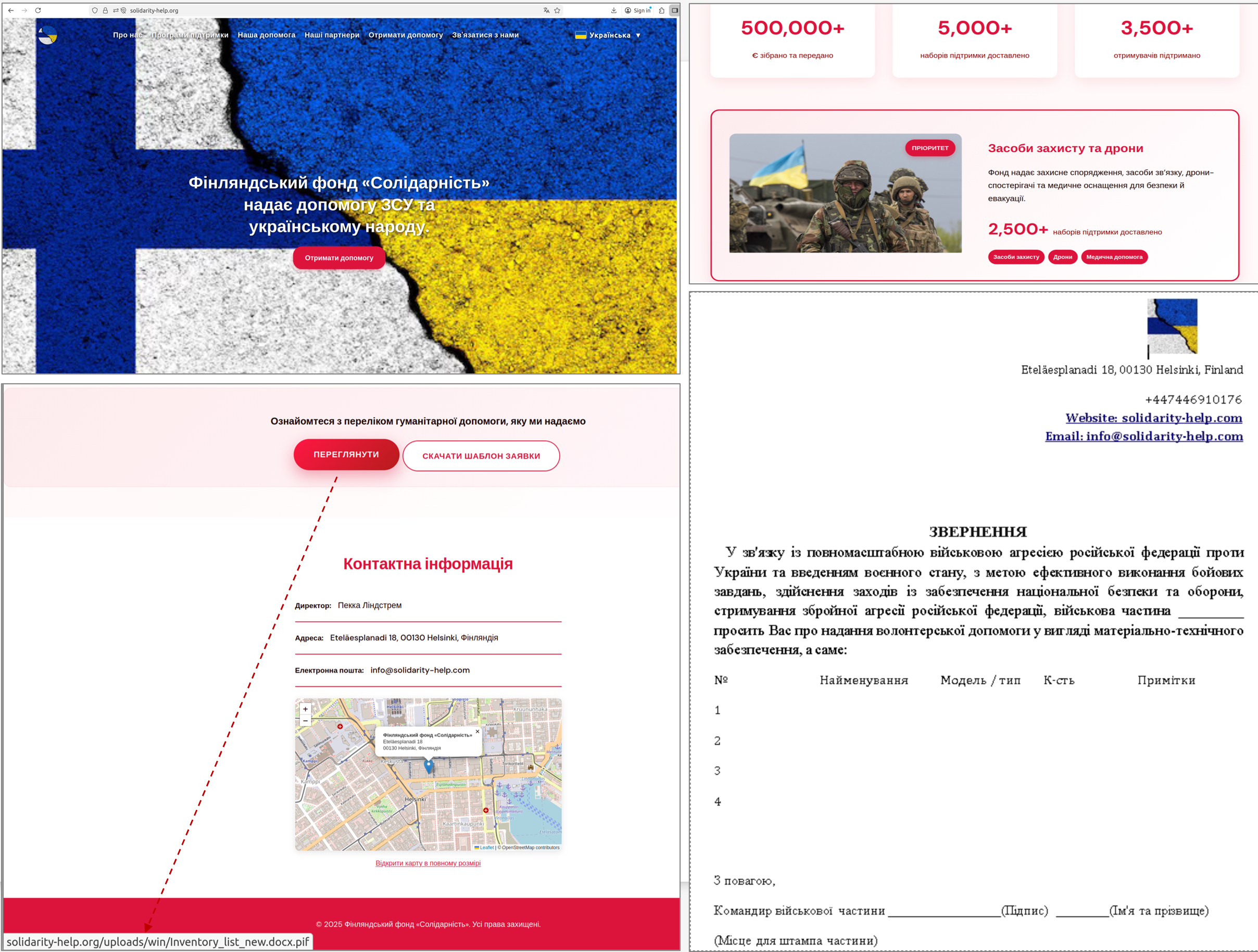
To gain access to their targets, the attackers engaged in a sophisticated form of social engineering with a twist: they reached out to them on Signal or WhatsApp with a seemingly charitable cause to support Ukraine during its time of war. Their seemingly altruistic goal made the target officials much more receptive to the phishing scam:
Source: CERT-UA
- Approach and link: Start talking to the potential victim and send them an invitation to visit the site of what appears to be an official charity website (such as harthulp-ua[.]com or solidarity-help[.]org).
- Malicious download: Encourage the victim to download a file, in the guise of a report or a list of relief materials, from the bogus site. The file will be in the form of a password-protected zip file, giving it a sense of authenticity.
- Deceptive file: The password needed to unlock the archive is provided. It contains an executable file that has a double extension, such as a file labeled “Document.docx.pif” that looks like a typical Word file.
- Backdoor installation: Once the victim executes this innocent-looking file, the PluggyApe virus is installed on their computer.
The Humanitarian Bait
Attackers initiate contact via Signal or WhatsApp, posing as representatives of a charity foundation supporting Ukraine’s efforts.
Malicious Web Portals
Targets are directed to legitimate-looking charity sites such as harthulp-ua[.]com to establish trust and encourage malicious downloads.
Password-Protected Archives
The malware is delivered within a password-protected ZIP/RAR archive. This tactic bypasses standard email filters and creates a false sense of legitimacy.
The Extension Masquerade
Files utilize double extensions like Document.docx.pif. Since Windows hides known extensions, it appears as a standard Word document.
Silent Installation
Upon execution, the seemingly harmless file silently deploys the PluggyApe Backdoor, granting adversaries full remote access to the system.
The attackers created a fake charity website that appeared legitimate and urged victims to download the “document” that actually has malicious intent. This resulted in the use of password-protected archives and legitimate-appearing websites that increased the scam’s authenticity. This time around, victims were misled into thinking that what they received were legitimate files pertaining to charity work.
PluggyApe Backdoor Capabilities and Persistence
PluggyApe, once installed on a target machine, works as a stealthy spyware tool as well as a remote-access backdoor. Despite the fact that it is a Python code, it is delivered as a normal Windows application. This is because it is bundled using a bundler to ensure that it does not trigger any alarms. After installation, the malware proceeds to ensure that it has control over the target machine. This is achieved through the following:
RECONNAISSANCE
Deep system profiling and hardware fingerprinting to secure target isolation.
EXFILTRATION
Silent data staging and multi-vector transmission to adversary infrastructure.
SHADOW OPS
AV evasion via process hollowing and encrypted payload execution.
REMOTE CONTROL
Full orchestration of arbitrary commands via Reverse-TCP connection.
PERSISTENCE
Registry injection and persistence hooks ensuring execution at every boot.
INFRASTRUCTURE BREACHED
- System profiling: It involves gathering information about the compromised system and creating a unique system identifier for the affected computer.
- Data exfiltration: This is where the collected data from the system, as well as the unique identifier, is sent to the attackers’ server.
- Silent listening: Operates in the background waiting for further directions or codes from the remote operators.
- Remote access: This allows the hackers to run any command or install further malware on the compromised system.
- Persistence: This involves altering system parameters such as adding it to Windows Registry startup keys to ensure it runs every time the computer starts.
In other words, PluggyApe allows the operator complete control of an infected computer while keeping a low profile.
Evolution of the Attack: PluggyApe Version 2 Updates
- Continuous Attacker Adaptation: The attackers were constantly modifying their methods in order to avoid being detected.
- Earlier Loader Disguise: In earlier PluggyApe incidents, malicious loaders were disguised using the “.pdf.exe” file extension.
- Change in December 2025: The attackers’ strategy changed in December 2025 as PluggyApe version 2 was deployed.
- New Loader Format: In this new campaign, “.docx.pif” files were used as the malicious loader.
- Use of the Legacy File Format for Abuse: The file extension .pif, which is a legacy Windows file format, made the file look like it belonged in the document category.
- Improved Stealth Abilities: The PluggyApe v2 malware used better code obfuscation methods to resist sandbox detection.
- New C2 Communication Method: Malware introduced a new command-and-control communication channel based on MQTT protocol.
- Dynamic Infrastructure: Rather than embedding the C2 addresses directly into PluggyApe, the server details are obtained by the malware in encrypted format from publicly available “paste” sites like Pastebin or Rentry.
- Enhanced Resilience: This makes it easy to rotate and pivot infrastructure, and the backdoor becomes much harder to remove.
Mobile Devices & Convincing Lures Increase Risk
Another disturbing trend is related to mobile communications and personal messaging services, which have weaker security control in general. Many officials communicate using services such as WhatsApp or Signal on their mobile phones, which do not provide the same level of security as their office computers.
Thus, messaging services have turned out to be popular malware delivery services for attackers in targeted attacks. Thus, conventional security systems might fail to detect an attacker’s link sent in what appears to be a legitimate message, particularly if it is sent to a personal device.
Further, the attackers did everything possible to ensure their approach seemed authentic. The attackers frequently used hacked accounts and/or phone numbers from genuine Ukrainian telecom operators such that the incoming call came from a known and trusted source.
In fact, these operatives spoke fluent Ukrainian and went to the point of making audio or video calls to authenticate their claim of legitimacy. Moreover, they took the initiative to gather all necessary personal details of their targets to make their scam more convincing. This level of social engineering made it possible for these tech-savvy government officials to fall for their charity scam.
MITRE ATT&CK Tactics, Techniques, and Procedures (TTPs)
Although PluggyApe does not yet have an official entry in the MITRE ATT&CK® catalog, its observed behaviors in real-world campaigns can be mapped to specific ATT&CK techniques. This behavior-based mapping provides valuable insight into how the malware operates across the attack lifecycle.
| Tactic | Technique | Description |
|---|---|---|
| Initial Access (TA0001) | T1566.001 | Phishing: Spearphishing Attachment: Attackers use social engineering and malicious attachments (e.g., fake document files) to gain initial foothold. |
| Execution (TA0002) | T1059.001 | Command and Scripting Interpreter: PowerShell: Malware execution via PowerShell has been observed in campaign behavior. |
| Persistence (TA0003) | T1547.001 | Boot or Logon Autostart Execution: Registry Run Keys: PluggyApe persists by registering itself in Windows Registry run keys. |
| Command and Control (TA0011) | T1071.001 | Application Layer Protocol: Web Protocols: MQTT (and in some cases WebSocket) are abused as C2 channels for remote instructions and data exfiltration. |
Case Study: Xcitium vs. PluggyApe
This demonstration shows how Xcitium protects endpoints against advanced malware threats in real time. Seven live PluggyApe malware samples are executed to simulate a realistic attack scenario involving unknown and untrusted payloads.
Although the files appear harmless, each sample is an active PluggyApe malware variant with no prior reputation on the system. As the samples are launched sequentially, Xcitium’s Zero-Dwell technology instantly identifies every untrusted process and isolates it the moment execution begins without relying on signatures or cloud lookups.
Once isolated, the malware attempts common malicious behaviors such as process termination and file manipulation. However, all actions remain fully confined within the isolation environment. The malware is unable to impact host files, consume system resources, or establish any external communication.
By eliminating the exposure window entirely, Xcitium ensures that even brand-new, previously unseen PluggyApe variants are neutralized before they can cause harm. This video demonstrates how Xcitium’s prevention-first, Zero-Dwell security model stops sophisticated malware instantly keeping the endpoint secure, operational, and uncompromised.
Indicators of Compromise and Defensive Measures
It is worth noting that the Ukrainian government has provided indicators of compromise (IoCs) from the PluggyApe campaign to assist other organizations with detection and mitigation of this attack. Some of the main IoCs that have been identified from this attack are:
- Charity domains that were impersonated, such as harthulp-ua[.]com and solidarity-help[.]org.
- Malicious file attachments with double extensions (e.g., files ending in
.docx.pifor.pdf.exe). - Messages delivered using compromised or spoofed Ukrainian phone numbers or accounts.
As a consequence, security professionals should make sure to update their defenses against this threat by incorporating these IoCs and spreading awareness about this threat among their staff.
Finally, it’s essential to remain alert against all kinds of unsolicited communications, including local and well-meaning ones. This includes basic precautions like checking a message’s origin for confirmation through a different method and scanning files for viruses prior to launching them to prevent a backdoor like PluggyApe.
PluggyApe Malware SHA-1 Samples & Zero‑Dwell Threat Intelligence Reports
Conclusion: When Trust Becomes the Payload
The PluggyApe campaign shows how modern espionage operations win without breaking perimeter defenses, they persuade the target to do it for them. A charity themed conversation on WhatsApp or Signal, a convincing link, a password protected archive, and a disguised file like “Document.docx.pif” were enough to deliver a full backdoor into Ukrainian defense related targets.
Why This Attack Works So Often
This operation exploited predictable human and workflow patterns:
- Messaging apps sit outside many enterprise security controls
- Password protected archives reduce inspection opportunities
- Double extensions and legacy formats make malware look like documents
- Stolen or spoofed trusted accounts make verification feel unnecessary
- Once executed, the backdoor enables profiling, data theft, remote control, and persistence
Where Xcitium Changes the Outcome
For organizations using Xcitium Advanced EDR, powered by Xcitium’s patented Zero-Dwell platform, this attack would not succeed.
- Unknown payloads are isolated the moment execution begins
- Malware actions remain unable to impact real files or system state, code can run without being able to cause damage
- Process termination attempts, file manipulation, and external communications do not translate into compromise
- Even new PluggyApe variants lose the ability to establish control or persistence
Strengthen Defense Where Espionage Starts
When attackers hide behind humanitarian narratives, prevention must trigger at execution, not after access is established. Choose Xcitium Advanced EDR to stop deception delivered malware before it can change outcomes.