When Legitimate Notifications Become the Attack Surface
Phishing has transitioned from spoofing domain names to leveraging legitimate notification systems under trusted infrastructures. Task notifications, as a workflow, allow attackers to send emails that appear to be legitimate @google.com emails, even passing most phishing filters.
People rely on automated notifications for tasks, documents, approvals, and HR notifications. Phishing, as a problem, remains massive one of the largest anti-phishing organizations detected over 3.8 million phishing attacks in 2025 and attackers are continually seeking to optimize phishing campaigns to appear legitimate.
The Hidden Problem With Email Authentication
Modern email authentication helps, but it solves a narrower problem than most people assume. SPF lets domain owners authorize which servers can send mail for a domain. DKIM lets the domain take responsibility for a message via a verifiable signature. DMARC then ties policy and reporting to SPF/DKIM results so receivers can enforce anti-spoofing rules.
What those standards can’t guarantee is equally important. Authentication can tell you, “This email really came through infrastructure authorized for this domain.” It cannot reliably tell you, “This request is safe,” especially when an attacker uses a legitimate automation feature to send a harmful link from a legitimate sender.
- Authentication helps answer: Was this domain spoofed?
- Authentication does not answer: Is the workflow being abused? Is the call-to-action malicious? Should a user type credentials after clicking?
As a result, “SPF/DKIM/DMARC pass” becomes a false comfort signal in exactly the scenarios that look most trustworthy to humans.
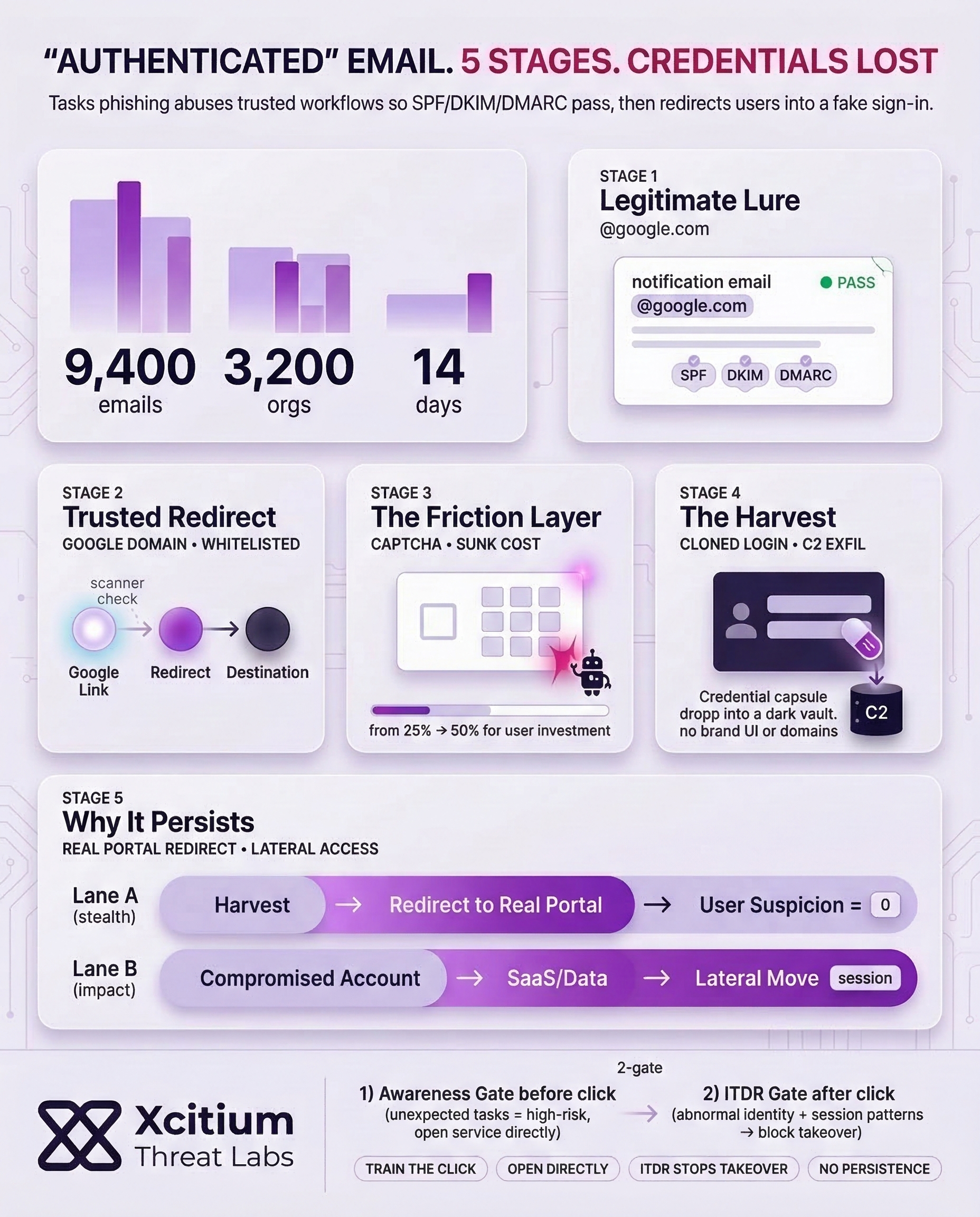
Reputation Abuse: The link utilizes a “google.com” open redirect or a trusted sub-service URL.
Detection Bypass: Security scanners often whitelist Google domains, allowing the redirect to reach the target user.
Path: google.com/url?q=…
Reputation: WHITE_LISTED
Scanner: PASSED

Anti-Bot: CAPTCHAs or intermediate challenge pages prevent automated security bots from analyzing the final phishing destination.
Psychology: Completing a small task increases the user’s investment and trust in the process (Sunk Cost Fallacy).
Please confirm your identity to access the company portal.

Anatomy of a Trusted-Platform Phishing Email
In the scenario, the lure is designed to look like a normal routine task and encourages the user to complete the action of “employee notification.” This is effective because it can evade the user’s defenses as well as spam filters during a busy day.
Reports of similar activity have been observed at a larger scale. In these campaigns, the attacker leverages cloud automation and notification tools to send emails from legitimate Google-owned addresses. This is designed to trick the user into following a redirect chain to a fake sign-in page. In one campaign, nearly 9,400 phishing emails were sent to around 3,200 organizations across two weeks. In the initial stages of the campaign, legitimate Google domains were used.
An example of a typical trusted platform attack chain:
- A legitimate notification is received from a trusted sender.
- The notification clicks on a URL hosted on a trusted domain.
- Redirects, interstitials, and CAPTCHAs are present.
- The user clicks on a fake login page and enters the credentials.
Crucially, multiple reports emphasize this is usually abuse of legitimate features, not a breach of the provider’s core infrastructure, which is why it can be harder to prevent with traditional “known-bad sender” approaches.
Practical Defenses That Don’t Rely on Perfect Users
The reason for this is that since these lures are based on trust from actual systems, the best way to defend against them is to minimize the need for human judgment. One notable finding in the major breach dataset was that 60% of the breaches involved a human element.
Instead, use layered controls that assume some clicks will happen:
- Shift sign-ins from email links: Encourage users to open the service directly (bookmarks/URLs), especially for the verification prompts.
- Harden access: prefer phishing-resistant MFA when possible; enhance session policies for unusual login behavior.
- “Trusted sender” is high impact and not safe: abnormal notification rates, unusual recipient rates, and first-time senders in the workflow.
- Enhance reporting: make it easy for users to report suspicious email and route high-confidence abuse signals to the platform’s abuse reporting channels.
Finally, keep the goal clear: reduce successful credential entry, not just spam volume. Attackers adapt quickly; therefore, your controls must focus on outcomes (stolen sessions and account takeover) as much as signals (sender reputation).
Conclusion: When “Authenticated” Email Becomes a Weapon
Tasks phishing highlights a dangerous shift in social engineering. Attackers are no longer spoofing domains, they are abusing legitimate notification workflows to deliver messages that pass SPF, DKIM, and DMARC. When email looks authenticated, users lower their guard, and that is exactly the moment attackers exploit.
Why This Threat Bypasses Traditional Email Security
Email authentication confirms infrastructure legitimacy, not user intent. It cannot tell you whether a trusted workflow is being weaponized, or whether the call to action leads to credential theft. That gap is why authenticated platform emails remain effective.
Why Most Organizations Are Exposed
These campaigns scale because they look routine during a busy day.
- Legitimate Google-owned sender addresses and domains are used early in the chain
- Redirects, interstitials, and CAPTCHAs add credibility before the fake sign-in page appears
- A documented campaign sent nearly 9,400 emails to about 3,200 organizations in two weeks
Where Xcitium Changes the Outcome
With Xcitium in place, this attack would NOT succeed.
- Xcitium Cyber Awareness Education and Phishing Simulation trains users to treat unexpected task notifications as high-risk, verify context, and access services directly rather than through embedded links.
- Xcitium Identity Threat Detection and Response (ITDR) detects abnormal identity behavior and suspicious session patterns, stopping takeover attempts before they become persistent access.
The attacker loses because the user does not complete the workflow, and identity misuse is blocked if a click happens.
Defend the Inbox for the Trusted Platform Era
This is not a spam problem, it is a trust-abuse problem. Reduce credential entry, shorten the attacker window, and monitor identity sessions continuously.