Picture someone browsing through your own accounts right now. They’re using your saved passwords, your open sessions. Your screen shows nothing out of the ordinary. That’s the pitch behind MedusaHVNC, a remote access trojan making the rounds since late July 2026. It isn’t a one-off tool built for a single campaign, either. It’s sold as malware-as-a-service, complete with an operator console. A dedicated website and a Telegram channel handle distribution. Anyone willing to pay gets a working copy.
What is MedusaHVNC? A remote access trojan that opens a hidden, non-visible desktop on a victim’s machine. From inside it, the malware drives the victim’s own already-logged-in browser sessions. Passwords, cookies, and browsing history come out through a built-in “Browser Recovery” feature. The victim’s screen never shows a thing.
A Second Desktop, Right Next To Yours
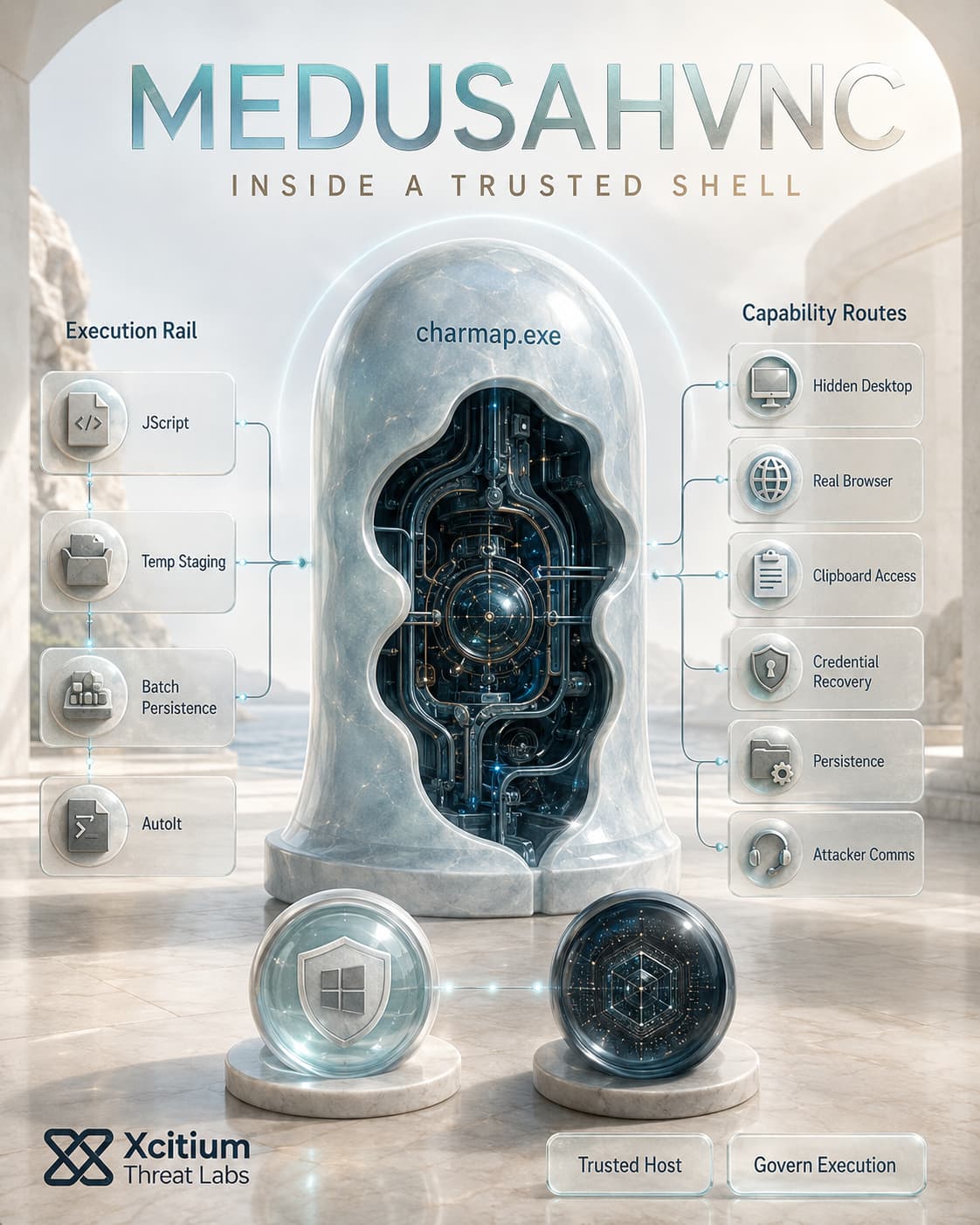
Windows has supported multiple desktop objects per session for decades. Automation tools and specialized software use them, mostly software that never needed a visible interface. MedusaHVNC repurposes that same feature. It opens a second desktop the victim never sees. Inside it, the malware launches a real, fully functional browser. That browser uses the victim’s actual profile and whatever sessions were already logged in.
One detail makes this particularly effective. Windows shares the clipboard across every desktop within a session. A process on the hidden side can read or write clipboard data the victim set on the visible side. Most monitoring tools never treat that as crossing any kind of boundary.
Browser Recovery Does The Actual Stealing
The malware’s advertised “Browser Recovery” feature targets Chrome, Edge, Brave, Firefox, and Telegram. It pulls saved passwords, cookies, and browsing history straight out of each one. The session already belongs to the victim, and it’s already authenticated. That means no login to fake, and no credential-stuffing step required.
Getting there takes several stages. A JScript launcher runs through Windows Script Host first. It waits several seconds, then drops files into a temp folder. A batch script gets added to the Startup folder for persistence. From there, an AutoIt interpreter decrypts a payload using a simple XOR key. That payload gets injected into charmap.exe, the ordinary Windows Character Map utility. A second, heavier encryption layer unpacks the final payload after that.
Why Detection Tools Never Saw It Coming
The real dealbreaker here is not the malware but how it works. Any particular action performed by MedusaHVNC depends on standard Win32 APIs. Screen capturing, simulated user input, clipboard manipulation all of those are used every day by many applications. Each one of them does not look suspicious. Injection into charmap.exe does help as well. This technique leverages a reputation of a known, signed executable.
The Blind Spot Nobody Was Watching
Where it really lies is something behavioral monitoring systems never cared to investigate where does the process run, namely, which desktop. It is generally assumed by most detection systems that any process activity that is observable on a machine is actual. However, running a process on a desktop that cannot be accessed is outside the scope of such activity.
However, Microsoft’s internal security team did notice this gap. There emerged a specific field of telemetry to detect the desktop where the process runs. There were several known cases of malware families running on a hidden desktop that prompted the emergence of that telemetry field. It was never considered by any other monitoring solution because it was not among the classified dimensions of the problem.
This is the fundamental weakness of the classification-based approach in general. A detection engine needs to determine whether the process is malicious, and each API call made by MedusaHVNC says “not malicious”. Execution governance solves that task in a completely different way. Instead of checking for malice, it restricts the ability of unknown processes to access certain parts of the system at the kernel level. No matter how innocent each action of a process may seem, it is restricted to execute those actions if it was not authorized in advance.
However, there is one thing that still cannot stay unnoticed. Data will inevitably leave the network through egress traffic.
Conclusion: The Desktop Is Hidden. The Execution Still Needs Permission.
MedusaHVNC proves that attackers do not need to take over the desktop a victim can see. They can create another one, launch a real browser inside it, inherit existing sessions, and operate through ordinary Windows capabilities while the visible screen remains unchanged.
The activity may be hidden from the user.
It should not be outside security control.
Why This Threat Matters
MedusaHVNC combines remote access, session hijacking, credential theft, persistence, and defense evasion inside one malware-as-a-service offering.
- A JScript launcher begins the execution chain through Windows Script Host
- Files are staged inside a temporary directory
- A batch file placed in the Startup folder provides persistence
- AutoIt decrypts and launches the next stage
- The payload is injected into the legitimate
charmap.exeprocess - Additional encryption protects the final implant
- A hidden desktop runs real browsers with the victim’s existing profile
- Browser Recovery targets passwords, cookies, browsing history, and authenticated sessions
- Shared clipboard access can expose data copied on the visible desktop
- Standard Win32 APIs make individual actions appear routine
The attacker does not need to create a fake login page. The victim has already authenticated.
That makes the endpoint itself the trusted access path.
Where Xcitium Changes the Outcome
Xcitium Advanced EDR, powered by Xcitium’s patented Zero-Dwell platform, applies Execution Governance from the first unknown launcher through the final implant.
A script does not receive automatic trust because wscript.exe launched it.
An injected payload does not become trusted because it runs inside charmap.exe.
A hidden desktop does not create a hidden permission boundary.
Unknown code does not receive unrestricted execution rights.
File and registry changes can be isolated.
Persistence attempts can be governed.
Process injection and system modification can be constrained.
Attacker communications can be denied according to policy.
Code can run without being able to cause damage.
Traditional detection asks, “Does this API call look malicious?”
Execution Governance asks, “Should this unknown process be allowed to affect real systems and data at all?”
EDR detects execution.
Xcitium governs execution.
Govern the Desktop the User Cannot See
MedusaHVNC is designed around a visibility gap. The browser is real. The Windows APIs are legitimate. The activity takes place on the victim’s own device and may use sessions that are already trusted.
Security teams cannot depend on the user seeing something unusual. They cannot assume that a signed host process makes the code inside it safe. They cannot wait for credential theft or data exfiltration to confirm that execution was malicious.
Investigate unexpected wscript.exe and AutoIt activity.
Review Startup-folder changes and temporary staging directories.
Detect injection involving trusted Windows processes.
Block known command infrastructure.
Revoke browser sessions and tokens after suspected compromise.
Govern unknown execution before the hidden desktop becomes attacker control.