Attack Timeline and Scope
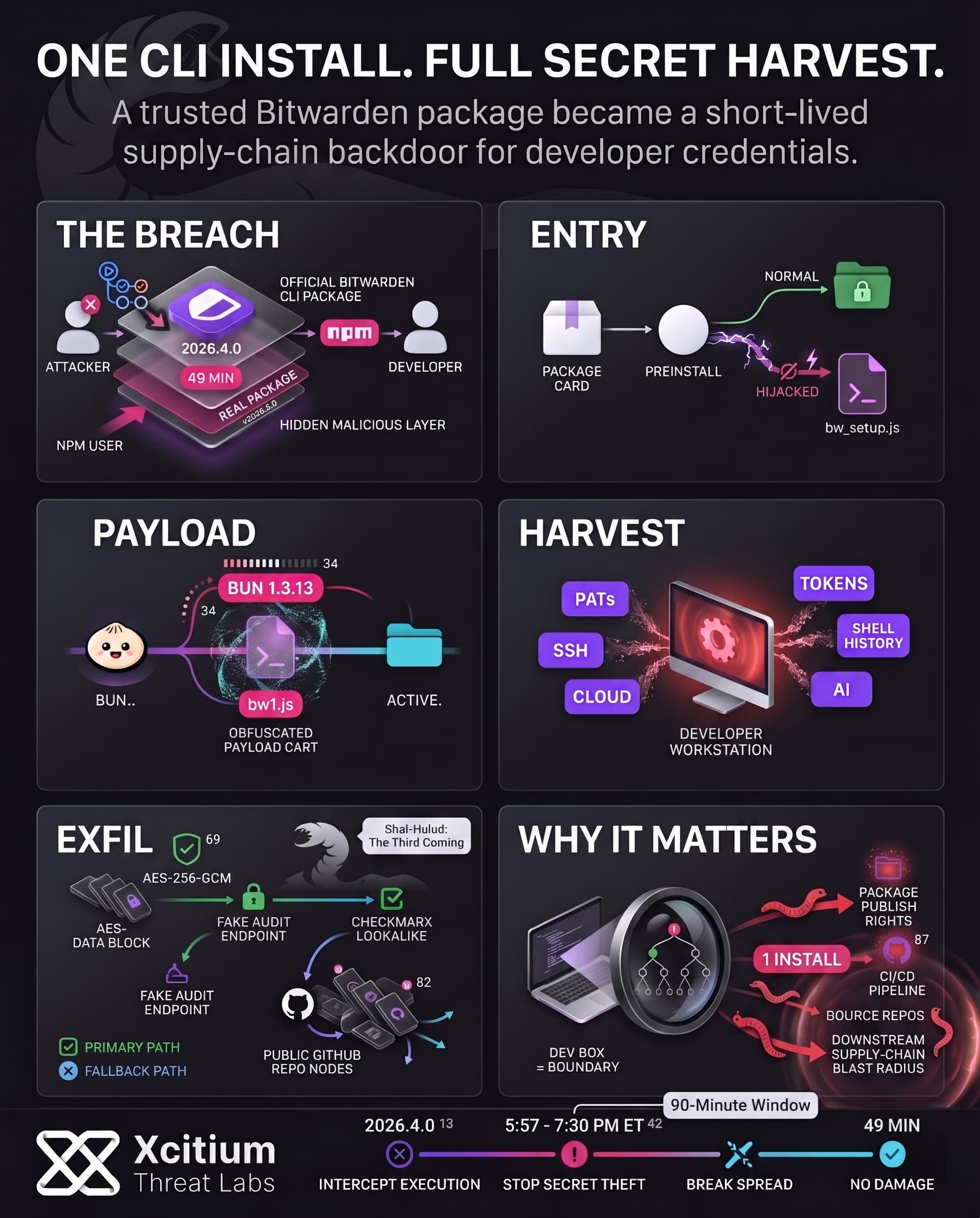
Recently, an infected version of the @bitwarden/cli software became publicly available via npm. This malicious version 2026.4.0 became available for a short period of about 90 minutes (from roughly 5:57 to 7:30 PM ET). Bitwarden confirmed the problem; the npm package got backdoored, but only during that small window of time. Specifically, the official announcement of Bitwarden made it clear that no user vault data or core systems were accessed.
Developers installing the CLI via npm got the malicious code, without being aware. The problem was limited in scope, it only affected those installing the malicious version 2026.4.0 in that time frame.
Bitwarden quickly acted upon the malware, access to npm got revoked, and an update to 2026.4.1 became available. Bitwarden also released the CVE for this compromised CLI package. According to the company, this attack was related to the “Checkmarx” supply chain attack. Most likely, attackers abused the GitHub action in Bitwarden build process.
How the Malicious Package Worked
The attackers developed a fake version of Bitwarden CLI which imitated the original software by altering the flow of its execution. Some changes made to the package.json file caused npm to invoke a custom loader (bw_setup.js) instead of running the Bitwarden CLI. To be more specific, the attackers changed the script preinstall to node bw_setup.js and pointed the CLI’s bin field for bw to that script. Thus, the attackers’ version of the software has all legitimate metadata but launches another application.
The loader (bw_setup.js) automatically installs Bun, after which bw1.js gets executed. In the code BUN_VERSION is defined as “1.3.13“, Bun gets installed via Git, executable rights get assigned, and finally bw1.js gets launched.
Key changes made to the malicious package included the following:
- Metadata Spoofing: The malicious package had all of Bitwarden’s standard metadata including the name and even version 2026.3.0 to give the package a look of authenticity.
- Custom Loader: The package’s preinstall file and the Bitwarden’s CLI entry point had been hijacked to run the bw_setup.js instead of Bitwarden’s actual package.
- Runtime Bootstrapping: The custom loader detects whether there is any Bun installed. In case not, the loader downloads and installs an appropriate Bun package and extracts it before executing the obfuscated bw1.js payload.
Thus, the malicious payload was executed during the npm install without the Bitwarden’s CLI ever getting executed.
Secrets Harvested and Exfiltration
With its operation commenced, it started harvesting all sensitive credentials from the host. The malware is created for collecting developer credentials and environment information in general. The collected credentials include:
- Authentication Tokens: NPM publishing tokens and GitHub Personal Access Token (PAT) from the user’s environment and configuration files.
- SSH/Git Credentials: SSH private keys and public keys
(.ssh/id_*), Git configuration files(.git/config, .git-credentials), and npm configuration file(.npmrc)that contains login tokens. - Environment Files: Shell history files
(.bash_history, .zsh_history), .env file containing environmental variable information, and user shell variables (loader also executed gh auth token to steal GitHub credentials from the CLI). - Cloud Keys: AWS access keys
(.aws/credentials), Google Cloud authentication file(.config/gcloud/credentials.db), and Azure credentials at common locations. - AI/ML Tool Secrets: Configuration and tokens for AI coding tools (e.g. Claude, Kiro, Cursor, Codex) were explicitly hunted, as seen in the code targeting files like
.claude.jsonand.kiro/mcp.json.
After gathering this treasure trove of keys and tokens, the malware encrypted them and exfiltrated the data. The stolen data is encrypted with AES-256-GCM before transmission. The primary exfiltration channel was an HTTPS POST to audit.checkmarx[.]cx, a domain impersonating security vendor Checkmarx. If that primary path failed, the payload fell back to a clever GitHub-based method: it staged part of a GitHub token via commit messages, then created a new public repository in the victim’s GitHub account to upload the encrypted secrets.
The malware explicitly creates a GitHub repository with a Dune-themed description: “Shai-Hulud: The Third Coming”. This confirms that the stolen data ends up in a public repo named using the attackers’ signature, making the credentials searchable by anyone. Public repos containing this exact string were found, each holding the encrypted blobs. The use of public repositories for exfiltration means that, if not discovered quickly, any GitHub user could stumble upon exposed secrets by searching for these Dune-themed tags.
Worm-Like Propagation & Shai-Hulud Connection
This malware didn’t just stop at one injection, as it operated like a worm inside the developer’s environments. It automatically uses the found npm publish token to inject itself into any other npm packages owned by the same developer and publish new versions containing malware.
On top of this, any GitHub tokens that were stolen by the attackers can be used to introduce rogue GitHub Actions workflow files that steal additional secrets from the CI/CD process. In summary, a single developer’s computer can now become the starting point for a whole supply chain infection attack.
This incident is similar to the previous campaigns of the Shai-Hulud threat group, where in the end of 2025 Shai-Hulud 2.0 compromised several hundred of npm packages. The worm used a similar propagation technique of stealing credentials and then abusing them in order to weaponize the developers’ projects against them.
What’s interesting, is that the malware also contained logic to fail if the operating system locale matched a Russian one, showing that the attackers specifically didn’t want to infect Russian systems. This geolocation restriction helps determine the source of the threat and the motivation behind the malware. Generally speaking, developers’ credentials not only get stolen and leaked, but are also used against all the projects owned by developers.
Conclusion: When a Trusted CLI Becomes a Secret-Stealing Backdoor
The Bitwarden CLI incident is a sharp reminder that supply-chain attacks no longer need fake packages or typosquatting to succeed. In this case, the malicious package was the real package, published through the legitimate npm channel for a brief 90-minute window, then used to harvest developer secrets before the actual CLI ever ran.
Why This Threat Matters
This was not just credential theft. It was a developer-environment takeover path.
- The package hijacked the preinstall flow and redirected execution to attacker-controlled scripts.
- It harvested GitHub tokens, npm tokens, SSH keys, cloud credentials, shell history, and AI tool secrets.
- Exfiltration used encrypted HTTPS and public GitHub repositories, making stolen secrets both hidden in transit and publicly retrievable afterward.
Why Developer Teams Stay Exposed
Modern build chains trust package managers by default. That trust is exactly what attackers monetize.
A single install can trigger malicious code before the expected tool starts.
One stolen npm token can seed additional poisoned packages.
One stolen GitHub token can extend the compromise into CI/CD workflows and downstream repositories.
Where Xcitium Changes the Outcome
If you have Xcitium Advanced EDR, this attack does not succeed the way the attacker needs.
- The malicious preinstall chain is intercepted at execution.
- The secret-stealing payload can attempt to run, but code can run without being able to cause damage.
- Credential harvesting, follow-on package abuse, and CI/CD expansion lose the execution path they depend on.
Secure the Developer Environment Before It Becomes the Supply Chain
The lesson from Bitwarden CLI is bigger than one compromised version. In modern software delivery, the developer workstation is part of the production security boundary. Protect it like one. Stop unknown code at runtime, before one install becomes a chain reaction across your ecosystem.