How LinkedIn Comments Became a Phishing Channel
Recently, a new wave of phishing attacks have been detected on LinkedIn. LinkedIn is a popular online platform with over 1 billion users worldwide. Therefore, it is a prime target for attackers.
In this new wave of LinkedIn phishing attacks, attackers are posting fake comments on users’ posts, notifying them that they violated LinkedIn’s policies. In these fake comments, users are informed that their account is temporarily restricted due to policy violations. However, users are given a link to resolve their account restrictions by clicking on it.
This is a new wave of LinkedIn phishing attacks, and users should be careful. These attackers are using LinkedIn’s logo and notifications to trick users. In these fake comments, users are tricked into clicking on a link.
These attackers are trying to trick users by using LinkedIn’s logo. Users who are not careful may think that they are legitimate notifications from LinkedIn’s support team. In addition, attackers are using short and concise sentences, which are often used by LinkedIn’s support team.
Visualization
Tactics: Fake Support Alerts and Spoofed Shortlinks
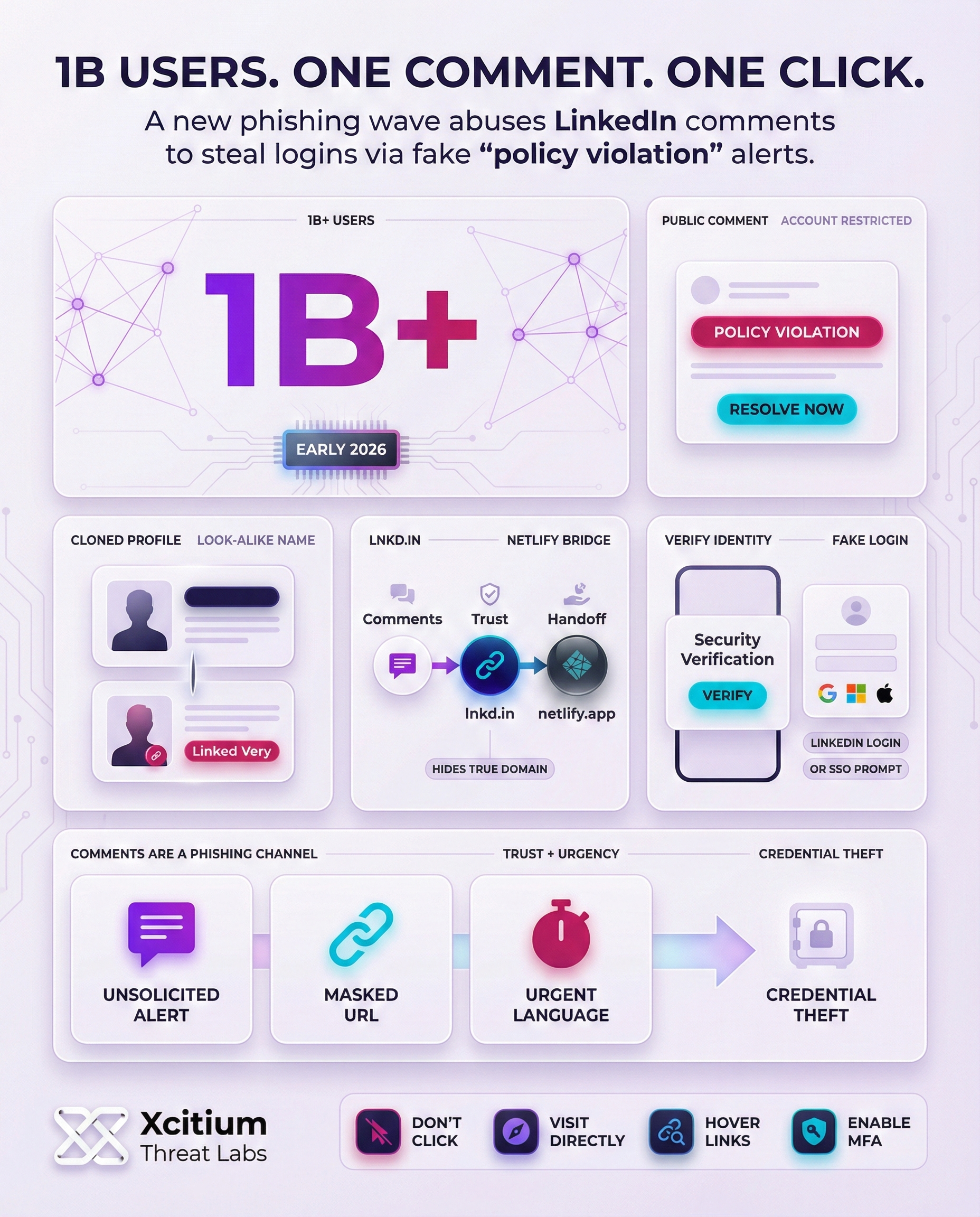
Attackers have set up fake profiles and company pages to trick users. They have set up profiles with names such as “Linked Very,” which are almost identical to the real LinkedIn logo and name. These fake profiles have no real content or followers but appear in the comment section with the phishing message.
Most of the time, the bot posts the comments, flooding popular posts with the phishing messages. Each phishing message is accompanied by a link that, when clicked, displays a fake account restriction message and then redirects the user to a fake LinkedIn login page. These fake pages are designed to steal the user’s login credentials.
Some of the phishing messages even ask users to provide their Google, Microsoft, or Apple login credentials. The attackers use LinkedIn’s official shortener, “lnkd.in,” to make the link look legitimate.
Identifying Red Flags: Suspicious Accounts and Links
The users can identify this scam by paying attention to several signs. For example:
- Unsolicited comments: LinkedIn will never alert you about breaking any rules on the platform. Therefore, if you receive a random comment from a user warning you about a ban on your account, you should be suspicious.
- Cloned profiles: The profile of the user commenting on your post may be very similar in name, with an impersonated logo, and no activity on their account.
- Masked URLs: Scammers often use lnkd.in instead of the original URL. Therefore, you should always hover over the link before clicking on it. If the preview shows a strange domain (like netlify.app or an unrelated site), do not click.
- Urgent requests: Messages pressuring you to “verify” your identity or “appeal” immediately are a common social-engineering trick. Legitimate platforms typically use more formal channels.
The users can avoid this scam by paying more attention to these signs. It’s claimed that this is not the first time that scammers have employed this method on other social media platforms.
For example, in 2023, scammers on X (Twitter) posed as bank support accounts and tricked users into calling a fake support number. The comment scam on LinkedIn is very similar but uses the platform’s branding and login pages instead.
Protection Advice: LinkedIn Response and Best Practices
LinkedIn is aware of the campaign and is trying to shut it down. The company’s spokesperson reminded users that the company doesn’t deal with policy violations through comments. The spokesperson further encouraged users who notice the scam to report it. All users on LinkedIn should be aware of the following security measures:
- Verify the source: If you notice a comment on a problem with a user’s account, do not click on the link. Instead, navigate directly to the official LinkedIn site to check the status of the account.
- Inspect links: Instead of clicking on the link provided by the user, hover over the link. If it doesn’t match the official LinkedIn domain, be aware that it might be a scam. Scammers often use different domains like .app, .site, etc.
- Enable multi-factor authentication (MFA): Adding a second authentication factor will make it difficult for hackers to get access to the account even if they know the password.
- Educate yourself: Educating users on the different types of phishing attacks can be helpful. Scammers can even use legitimate platforms like LinkedIn for their own gain.
Being safe on LinkedIn requires users to be aware of the different kinds of phishing attacks. Users should be cautious when reading a comment from a user. No legitimate service will ask users for their login credentials through a comment.
Users should be cautious and report any suspicious messages to LinkedIn. The above-mentioned measures will prevent scammers from gaining access to the user’s online life.
Conclusion: When Trust Is Weaponized in the Feed
This campaign proves phishing is no longer confined to email. Attackers are now hijacking public comment threads to inject fear, urgency, and authority into the exact place professionals lower their guard. A single fake “policy violation” comment, paired with a convincing link, can turn routine scrolling into credential theft.
LinkedIn is a high-trust environment, and the attackers exploit that trust with precision.
- Fake “support” style comments that claim your account is restricted, then push you to “verify” immediately
- Lookalike pages that mimic LinkedIn’s design closely enough to feel legitimate
- Abuse of reputable services like Netlify to mask the real destination and increase confidence
- Shortened links that hide the true domain until it is too late
When the delivery is a comment and the lure is urgency, even careful users can slip.
Where Xcitium Changes the Outcome
With Xcitium Cyber Awareness Education and Phishing Simulation, this attack would not succeed.
- Users learn the hard rule, LinkedIn does not handle policy violations through public comments
- Simulated exercises build pause and verify behavior before credentials are entered
- Lookalike domains and masked redirects become recognizable patterns, not surprises
- The attacker loses at the decision point, because the user never completes the login handoff
Protect the Account Before the Click
Modern phishing is designed to feel official, public, and time-sensitive. Defending against it requires training that makes suspicious behavior obvious before credentials are handed over.