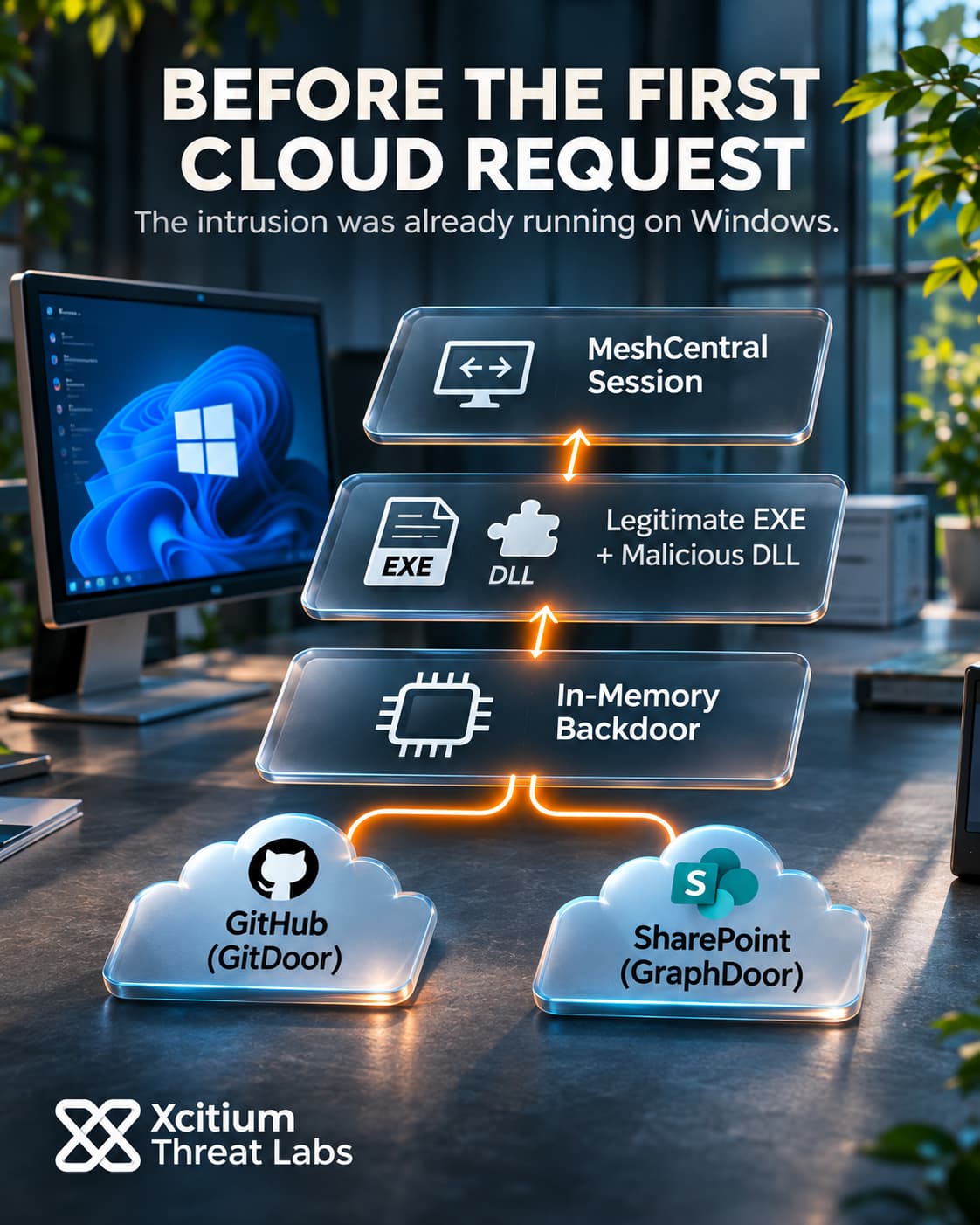
A remote management agent helped attackers plant Windows backdoors in a Taiwanese organization. The backdoors then reached out to services that organizations already use for software development and collaboration. GitDoor retrieved commands through GitHub, while GraphDoor used SharePoint through Microsoft Graph.
The case forms part of Operation ShadowCloud, an espionage campaign affecting organizations in Asia and Africa, primarily in the government sector. After gaining access to a host, the operators used cloud services to carry instructions. From the network alone, a connection to one of those services can look much like routine work.
A Remote Management Agent Stages The Backdoors
In the Taiwanese case, two instances of the MeshCentral Agent ran inside the organization. MeshCentral gives administrators remote access to desktops, command lines and files. In this instance, the agents connected to infrastructure under the attackers’ control. How they first reached the organization remains unclear.
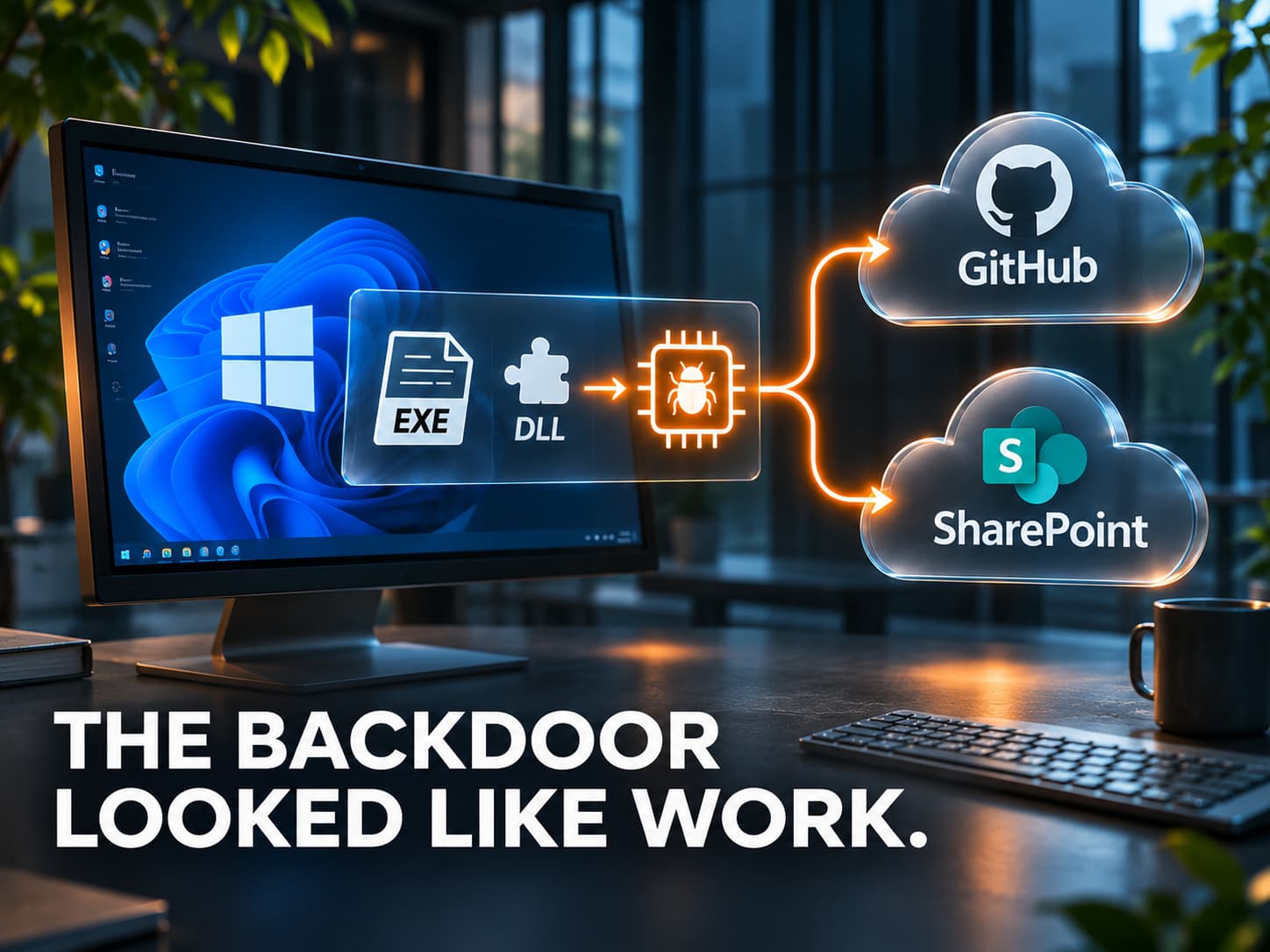
Once a session opened, the attackers used the agent to place a legitimate Windows executable alongside a malicious DLL and encrypted payload data. The executable then loaded the adjacent library. That library decrypted the payload and started backdoor code in memory.
This sequence gives the legitimate program one specific role. Its normal library-loading behavior starts the malicious code. Meanwhile, the encrypted payload can remain unreadable on disk until the loader opens it. A process tree can therefore show a familiar application at the point where backdoor execution begins.
GitDoor Splits Commands From Results
On startup, GitDoor collected details about the Windows host, including its name, user and network information. It also tagged the host and the session. One analyzed variant used a GitHub issue to register the infected machine and kept the issue number as a reference for later activity.
The sample used separate repositories for two sides of the conversation. A public repository supplied instructions, while a private repository received command results. GitDoor authenticated to GitHub with a personal access token to work with the private repository. That arrangement gave the operators a place to publish instructions while keeping results in a restricted workspace.
GitDoor could also retrieve encrypted plugins, including ones for screenshots and process enumeration. In practice, a connection to GitHub could represent several different actions. It might register a host, carry an instruction, retrieve a plugin or return a result. The destination alone gives an investigator little basis for telling these actions apart.
GraphDoor Uses An Application Identity
GraphDoor uses a different cloud identity model. It authenticates as an application and obtains an access token for Microsoft Graph. With that token, the backdoor accesses a SharePoint site used by the operators. The documented authentication flow runs without an interactive user sign-in.
GraphDoor uses a document library to store encrypted host information. The uploaded data has a filename that resembles a JavaScript source map. Next, the implant retrieves plugins through SharePoint list items and checks for command files intended for the infected machine.
Each type of cloud object serves a separate purpose. A document carries a report from the host, a list item supplies a plugin, and a command file gives the implant further work. Together, those operations let one collaboration service handle both data collection and tasking. The SharePoint objects involved belong to the infrastructure used by the operators. Access to those objects gives the malware a communications channel even when the affected user has no active SharePoint session.
Messaging Adds Another Route
ShadowCloud also used Ably, a real-time messaging service. GitDoor sent encrypted host information to the service as well as to its GitHub repository. Separately, analyzed proxy plugins could carry traffic through messaging channels.
This gives the activity several network profiles. Repository and document operations resemble ordinary API calls. A proxy plugin can instead use a longer-lived messaging connection. In both cases, the connection’s destination identifies the provider. Local process activity helps explain what that connection is doing.
Plugin analysis establishes what the backdoors could do on a compromised machine. The code supports collecting keystrokes, capturing screens and listing running processes. Which functions the operators used on each machine remains unclear. So does the full scope of the data they collected.
The Cloud Service Is Only Part Of The Evidence
On several affected systems, GitDoor appeared in staging locations also used by implants associated with FamousSparrow or CopperTurtle. The overlap supports a possible connection to Chinese-speaking operators. Who ran ShadowCloud, and whether it had government sponsorship, remains unresolved.
We examined another form of concealment in our Sparrow malware analysis. Some SparrowDoor variants shared an existing service port on the compromised system. ShadowCloud sent commands through external cloud services using normal platform operations. Both cases change what a familiar connection can mean once an intruder controls an endpoint.
For ShadowCloud, the sequence links several forms of evidence. A remote management agent established control, a local executable loaded an unexpected library, and a backdoor contacted cloud infrastructure. The events describe more together than a record of outbound HTTPS can show by itself.
Conclusion: Cloud Commands Start With Local Execution
ShadowCloud used familiar cloud services to operate backdoors after gaining a foothold on Windows. In the Taiwanese case, a remote management agent placed the files that started the backdoors. A legitimate executable then loaded a malicious library, which ran the next stage in memory. This sequence made the workstation an active participant in the intrusion before the first request to a cloud command channel.
GitDoor used GitHub to receive instructions and return results. GraphDoor used an application identity to reach SharePoint infrastructure used by the operators. Consequently, a cloud connection could look routine even while a backdoor accepted new tasks. The initial route into the organization remains unclear. That uncertainty makes it important to examine the remote management activity that preceded the first loader event.
Why This Threat Matters
- Remote management can extend an existing foothold. An unexpected agent or management session can explain how suspicious files first appeared on a workstation.
- Library loads provide a point of investigation. A normally trusted executable can start malicious code when it loads an unexpected library.
- Application access runs independently of user sessions. GraphDoor authenticated as an application, so an interactive sign-in was unnecessary for its documented command channel.
- Plugin retrieval can change the scope of an intrusion. Later downloads can add capabilities such as screen capture after the initial backdoor begins running.
- A familiar destination gives investigators limited context. The initiating process and preceding endpoint events help explain why a workstation contacted a cloud service.
Where Defensive Control Must Operate
Xcitium Advanced EDR, powered by Xcitium’s patented Zero-Dwell platform, gives responders endpoint telemetry for investigating suspicious execution on managed Windows devices. Execution Governance restricts unknown code’s access to local resources under the applicable endpoint policy. This puts a control point at the loader stage, before the backdoor can begin retrieving tasks.
When a host shows suspicious execution followed by cloud traffic, isolate it and preserve the available endpoint evidence. Then compare process and library-load records with the timing of outbound connections. That sequence helps responders identify other hosts exhibiting the same behavior.
Operational Takeaway
Use the endpoint timeline to scope the investigation. First, establish where the remote management agent ran and whether it belonged to an approved deployment. Next, review when the loader appeared and which processes opened outbound connections. Before returning affected devices to service, verify that the approved management configuration is in place and that follow-up monitoring shows no recurrence of the loader or its associated traffic.