YellowKey is a recently discovered zero-day exploit for Windows 11 that can circumvent BitLocker encryption. This means that anyone who gains physical access may plug in a malicious USB and restart the system in recovery mode so as to gain access to an unrestricted command prompt on an encrypted drive.
The way this flaw exploits the security of the operating system is through the transaction log that Windows keeps. Specifically, using this exploit, one can disable the recovery script, which acts like unlocking BitLocker without needing any password at all.
Exploit Mechanics: Transactional NTFS and WinRE Manipulation
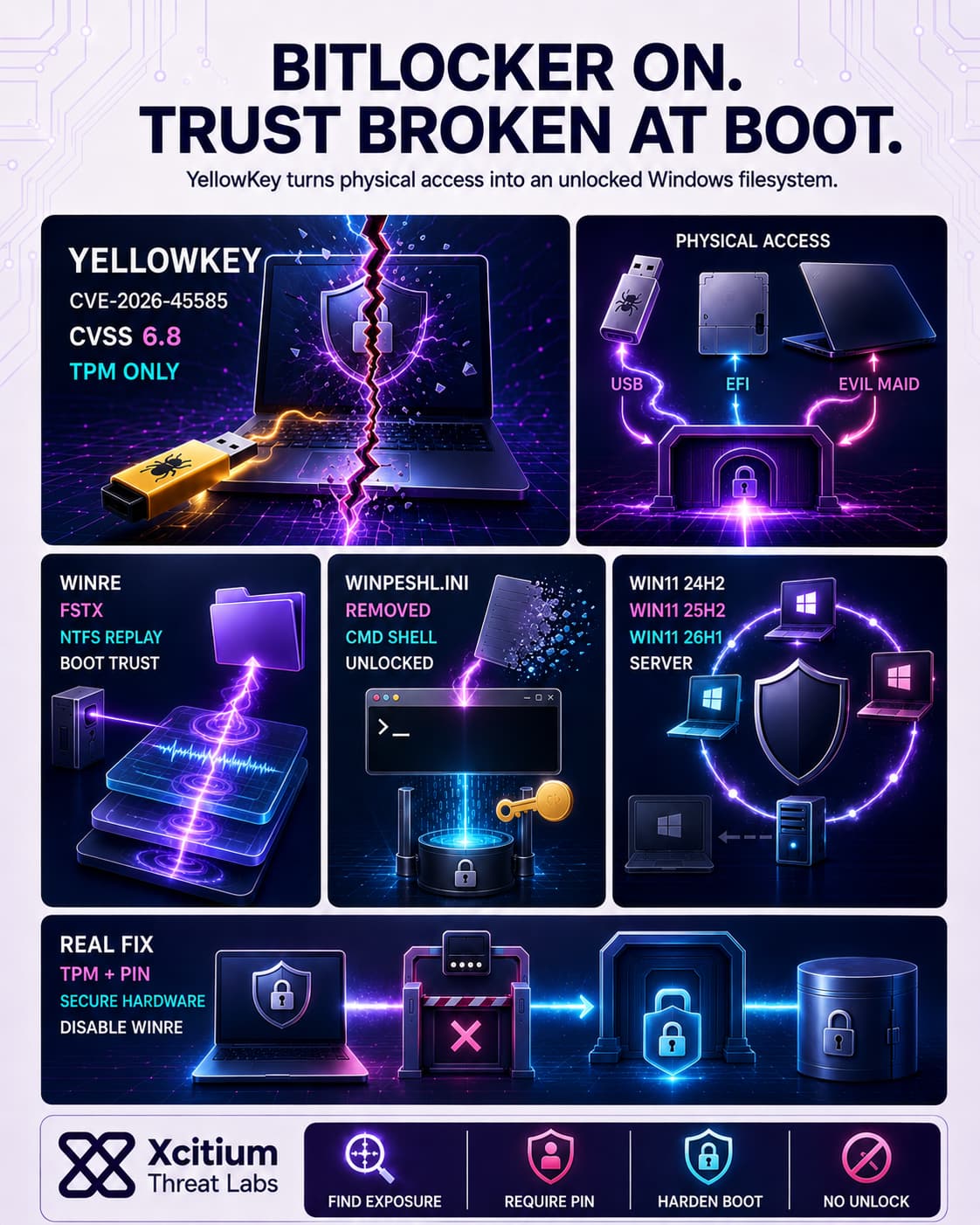
The Windows operating system environment is crucial to how YellowKey works. Specifically, WinRE’s file transaction system is exploited: Windows will replay NTFS transaction logs during a recovery boot if they are found in a special FsTx folder on any attached drive. YellowKey uses this by placing a malicious FsTx directory on external media.
When the system boots into WinRE, the NTFS replay feature applies the attacker’s logs, which delete the winpeshl.ini file that normally enforces the locked recovery interface. As a result, WinRE falls back to spawning a full command prompt. By that time, the BitLocker-encrypted volume has already been transparently decrypted by the TPM. The attacker thus gains a shell on an “unlocked” filesystem, allowing data access despite BitLocker protection.
Attack Vectors and Execution Paths
YellowKey requires physical access, but the attacker has multiple ways to deliver the payload. The researcher outlined three main scenarios:
- USB Deployment: Insert a USB drive prepared with the FsTx folder into the target and reboot into WinRE. This triggers the recovery environment with the malicious logs.
- EFI Partition Injection: Write the FsTx payload directly to the system’s EFI (boot) partition on disk. An attacker with brief access can mount and modify the EFI volume, then reboot, causing WinRE to read the malicious FsTx data.
- Evil-Maid Scenario: Remove the drive from the machine, mount it elsewhere, inject the FsTx directory on its EFI volume, and reattach it. Once powered back on into WinRE, the exploit runs exactly as above.
In each case, the outcome is the same: the NTFS log replay deletes winpeshl.ini, and WinRE drops to a command shell on a volume that BitLocker still thinks is encrypted. These paths make YellowKey a true “evil maid” or lost-device threat: even unattended or stolen laptops are vulnerable if BitLocker is in its default mode.
BitLocker Bypass
• Servers: Windows Server 2022/2025.
• Condition: Devices using TPM-only BitLocker encryption are most vulnerable.
Impact and Affected Systems
YellowKey compromises current operating systems that have TPM-only BitLocker enabled. The vulnerability has been observed in Windows 11 (versions 24H2, 25H2, 26H1), Windows Server 2022/2025, whereas Windows 10 is reported safe from YellowKey because of different implementation of the recovery feature. All recent computers which utilize TPM-only BitLocker encryption mechanism are at risk.
YellowKey has received the ID CVE-2026-45585. The severity of the vulnerability, measured using the CVSS scale, is 6.8, and considering the need to have access to the physical computer, the issue can be classified as high-level severity. In practice, it implies that a thief stealing an encrypted BitLocker laptop (as well as having just some time to access it) would get the necessary information from the device.
Mitigation Techniques and Considerations
The problem has been recognized by Microsoft, who have issued advisory guidelines but not yet released a patch. The suggested solutions include modifying the WinRE image to ensure the removal of the rogue recovery program and a requirement for BitLocker to request a PIN upon boot-up: for instance, removing the autofstx.exe record in the WinRE bootup registry and regaining the BitLocker trust.
This prevents the execution of the FsTx auto-recovery process. Another important solution includes changing BitLocker configuration from “TPM-only” to “TPM+PIN”, which will prompt a pre-boot PIN from users. Although this creates an extra level of security, the developer of YellowKey has cautioned that YellowKey can be modified to bypass a PIN requirement in the future.
Completely disabling WinRE will ensure that YellowKey is stopped (but will disable recovery features). Other possible preventive measures include asking users to input PINs or BIOS passwords before booting up their computer. In any case, users should recognize that the vulnerability still exists.
Conclusion: When Physical Access Breaks Encryption Trust
YellowKey shows why disk encryption alone is not the end of device security. BitLocker may still be enabled, the drive may still appear protected, and the user may never reveal a password. Yet with physical access, a prepared USB device, and a recovery boot path, the attacker can manipulate WinRE behavior and reach an unrestricted command prompt on an already unlocked filesystem.
This is not a remote malware problem. It is a trust boundary problem at boot.
Why This Threat Matters
YellowKey targets the exact assumption many organizations make about lost or unattended laptops, that TPM-only BitLocker is enough.
- Physical access can become filesystem access
- Recovery logic can be abused before the user signs in
- TPM-only protection may unlock the drive without user interaction
- Stolen laptops can expose sensitive business data despite encryption
- No patch was available at the time of analysis, making mitigation critical
Any device that relies only on transparent TPM-based unlock is exposed to this class of attack.
Where Xcitium Changes the Outcome
For this specific vulnerability, the first line of defense is exposure visibility and configuration hardening.
Xcitium Vulnerability Assessment helps security teams identify systems that should not remain in a weak state.
- Devices missing required hardening can be prioritized
- Risky BitLocker posture, such as TPM-only protection, can be surfaced for remediation
- Teams gain visibility into endpoints that need configuration review, firmware controls, or stronger pre-boot authentication
With Xcitium in place, this risk becomes visible before physical access turns into data exposure.
Protect the Device Before It Leaves Your Control
Lost-device security must assume attackers will have time, tools, and physical access. Strengthen BitLocker with TPM+PIN, review WinRE exposure, restrict unauthorized boot paths, and continuously validate endpoint security posture.
Find weak configurations before attackers do.
Harden the devices that carry your data.
Choose Xcitium Vulnerability Assessment.