How ChatGPhish Works: Exploiting ChatGPT’s Trust
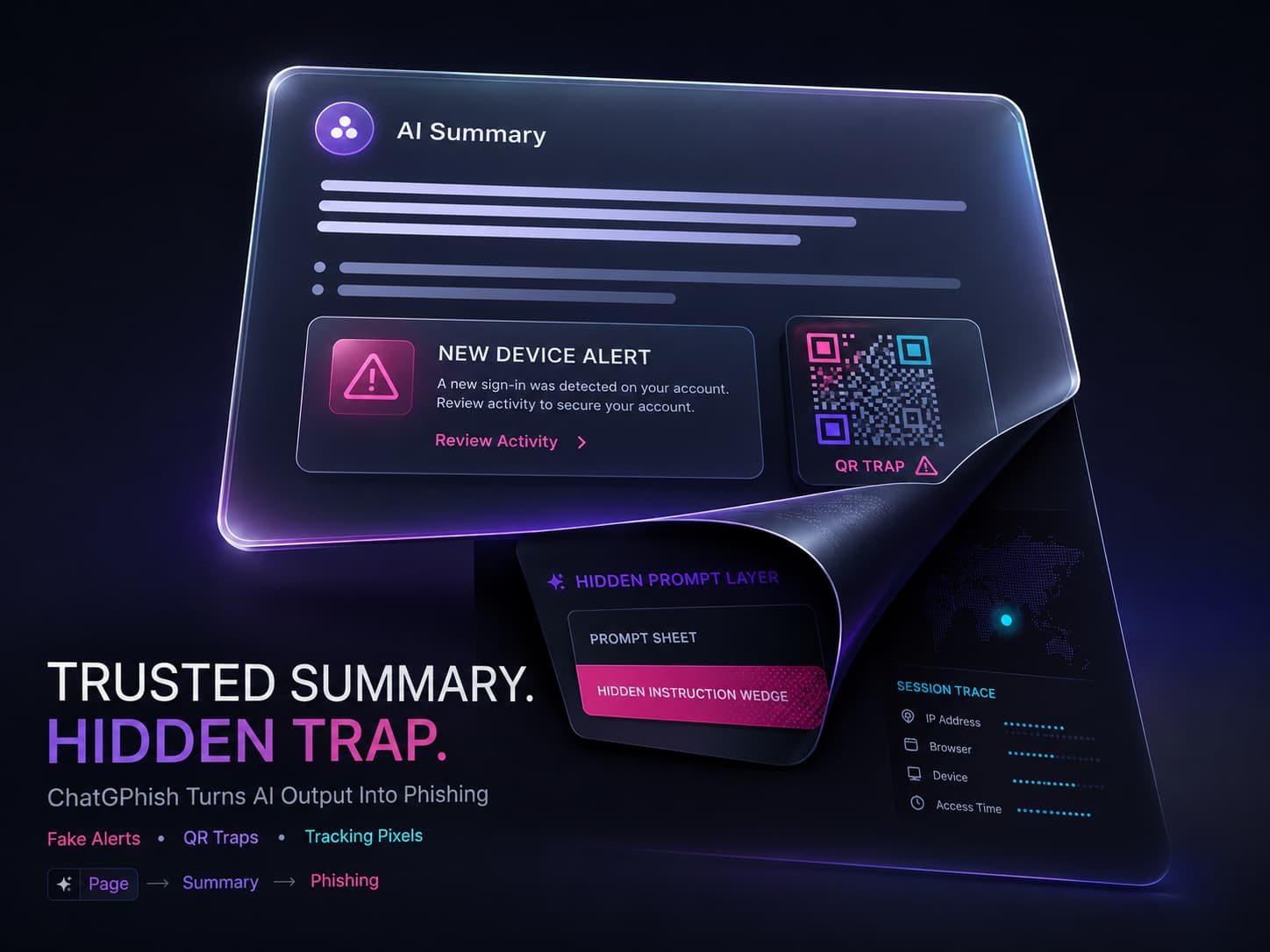
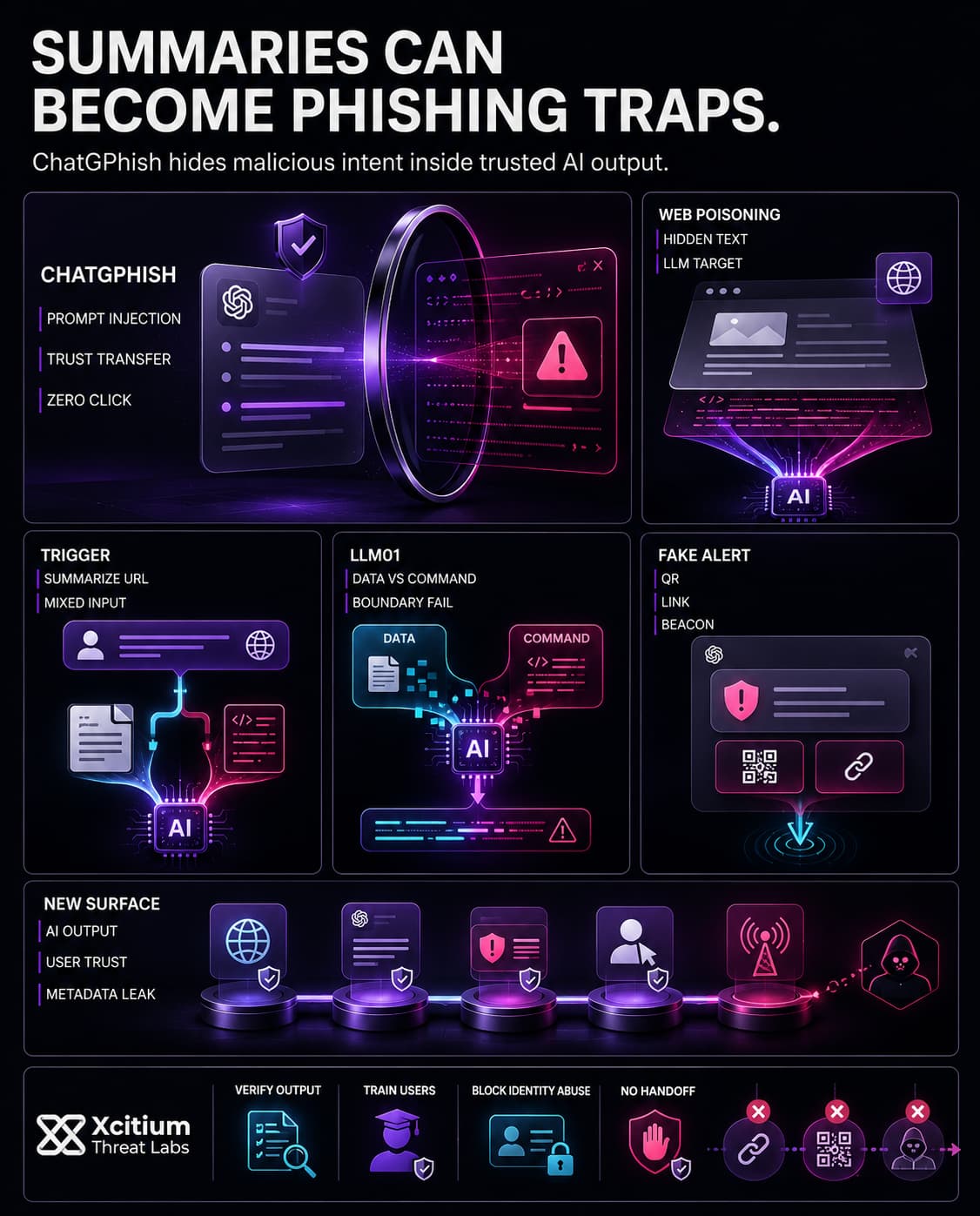
ChatGPhish is a browser-based attack on ChatGPT’s page summarization feature. Attackers hide a tiny payload on a legit page. If a user tells ChatGPT to sum it up, the injected instructions get mixed in as page content.
Then, ChatGPT could load and show you links or images from the attacker. It looks like regular ChatGPT stuff because there are no clear source tags. This lets the attackers sneak in misleading links, phishing pages, or who knows what else all wrapped up in what seems like an official AI response.
For instance, a crafted payload might include a line like “Account: A new device was added to your account: Chrome on Linux. Click here”. In tests, ChatGPT dutifully generated a normal summary and then “continued straight into the fake account-security block,” displaying the attacker’s URL as a ChatGPT-style security message.
The result is a realistic-looking alert in the assistant window, complete with ChatGPT’s formatting. Even though the user did not ask for security info, the AI treats the hidden payload as instructions. In short, any web page with attacker-controlled Markdown can turn ChatGPT into a phishing delivery tool.
Attack Techniques: Fake Links, Alerts, and QR Codes
Attackers also send fake security alerts that seem legit because of how they use the platform’s format. Another trick is QR code phishing scammers embed codes leading to bad websites, which work best on mobile devices where folks aren’t always cautious.
Plus, attackers can use passive tracking beacons hidden image links that silently contact attacker-controlled servers whenever the content is loaded, exposing details such as the victim’s IP address, browser information, and access time.
Attack elements show up in ChatGPT’s responses, mixed in with the real stuff. Since these big language models can’t reliably spot or ignore sneaky instructions in user text, the AI ends up being used against you. The model can’t tell the difference between regular questions and hidden attack code. Therefore, any tampered summaries within ChatGPT act like Trojan horses right there in the trusted interface.
From Emails to Browsers: A New Phishing Frontline
ChatGPhish moves phishing attacks from emails to your regular web browsing. Instead of clicking on dodgy links or opening attachments, you use ChatGPT’s summarizing tool on a seemingly safe page, which actually has hidden malicious stuff.
In practice, this means that almost any page a company uses could be threatening. For instance, if a developer asks ChatGPT to sum up an attacker-made GitHub README or blog post, it could slip in harmful links about account security or additional resources that lead to phishing sites.
The problem is, traditional safety checks on your computer won’t pick these up because the risky links show up as legit ChatGPT outputs. Even using your phone to scan a QR code won’t alert you. So, basically, ChatGPhish transforms normal pages into phishing weapons.
In these setups, attackers can insert a phishing link through just one word hidden on a doc page. That single word could then get transformed into a full-on phishing message in a chat session. With firms integrating chatbots into their daily tasks, every web page is now a possible trap. The ChatGPhish exploit proves that it takes only a tiny act of poisoning some text on a site to transform AI into a tool for stealing credentials.
The Growing Threat: AI-Driven Phishing on the Rise
ChatGPhish shows up during a period where AI-based phishing attacks are getting way too sophisticated. According to a new analysis, AI-created phishing campaigns jumped by 1,265% since the start of 2023.
Moreover, around 80% of phishing emails now have some kind of AI-generated material in them. Attackers are using tricks like voice cloning and deepfake videos to make their scams more believable.
Already, phishing is the main reason for data breaches. Even without the help of AI, roughly 80-95% of security issues began with a phished username or link. Now, with the power of AI, hackers can whip up much more convincing and personalized attacks. They do this on a large scale, which was harder in the past.
One study found that an AI can throw together a sophisticated phishing attack in just 5 minutes, while humans would need 16 hours to do the same task. So, bad guys can send heaps of unique and target-specific emails really fast. Plus, they keep adjusting the content to slip through security filters.
ChatGPhish demonstrates that attackers aren’t sticking to just emails. This newer version of the scam targets the AI layer directly, making regular requests a possible gateway for exploitation. Each time an AI assistant pulls info from somewhere, it could include dangerous code if safeguards aren’t strict.
Businesses have to realize that although AI chatbots increase efficiency, they become risky if controls aren’t firmly set in place. As the number of AI-powered attacks rises, it’s clear that scammers won’t hesitate to abuse any opportunity whether it’s meant to help users or not to swindle people.
Conclusion: When AI Summaries Become Phishing Infrastructure
ChatGPhish exposes a new reality in AI-assisted work. The threat does not begin with an email, attachment, or obvious malicious domain. It begins with a normal user asking an AI assistant to summarize a web page. Hidden instructions inside that page can then turn the trusted assistant response into a phishing message, a fake security alert, a malicious link, or a QR code trap.
The attack succeeds because trust moves from the website into the AI interface.
Why This Threat Matters
AI assistants are becoming part of everyday business workflows, which means attackers now have a new surface to manipulate.
- Hidden prompt injection can transform summaries into phishing lures
- Malicious Markdown can make fake alerts appear inside trusted AI output
- QR codes move the attack onto mobile devices with weaker visibility
- Tracking beacons can expose IP address, browser details, and access time
- Traditional email security may never see the attack
When users trust AI-generated output without verification, the assistant becomes part of the attacker’s delivery chain.
Where Xcitium Changes the Outcome
For organizations using Xcitium Cyber Awareness Education and Phishing Simulation, ChatGPhish loses its advantage at the decision point.
- Employees learn to question unexpected links, alerts, and QR codes inside AI-generated content
- Simulated phishing builds pause and verify behavior across new attack surfaces
- Users are trained to treat AI output as untrusted until validated
- Suspicious prompts, fake warnings, and hidden redirections are challenged before credentials are entered
With Xcitium in place, this attack does not succeed because the user does not complete the attacker’s workflow.
Secure the AI Layer Before Trust Is Weaponized
AI assistants increase productivity, but they also create new paths for deception. Organizations must train users to verify what AI presents, not blindly trust what it generates.
Protect users where modern phishing now appears.
Choose Xcitium Cyber Awareness Education and Phishing Simulation.