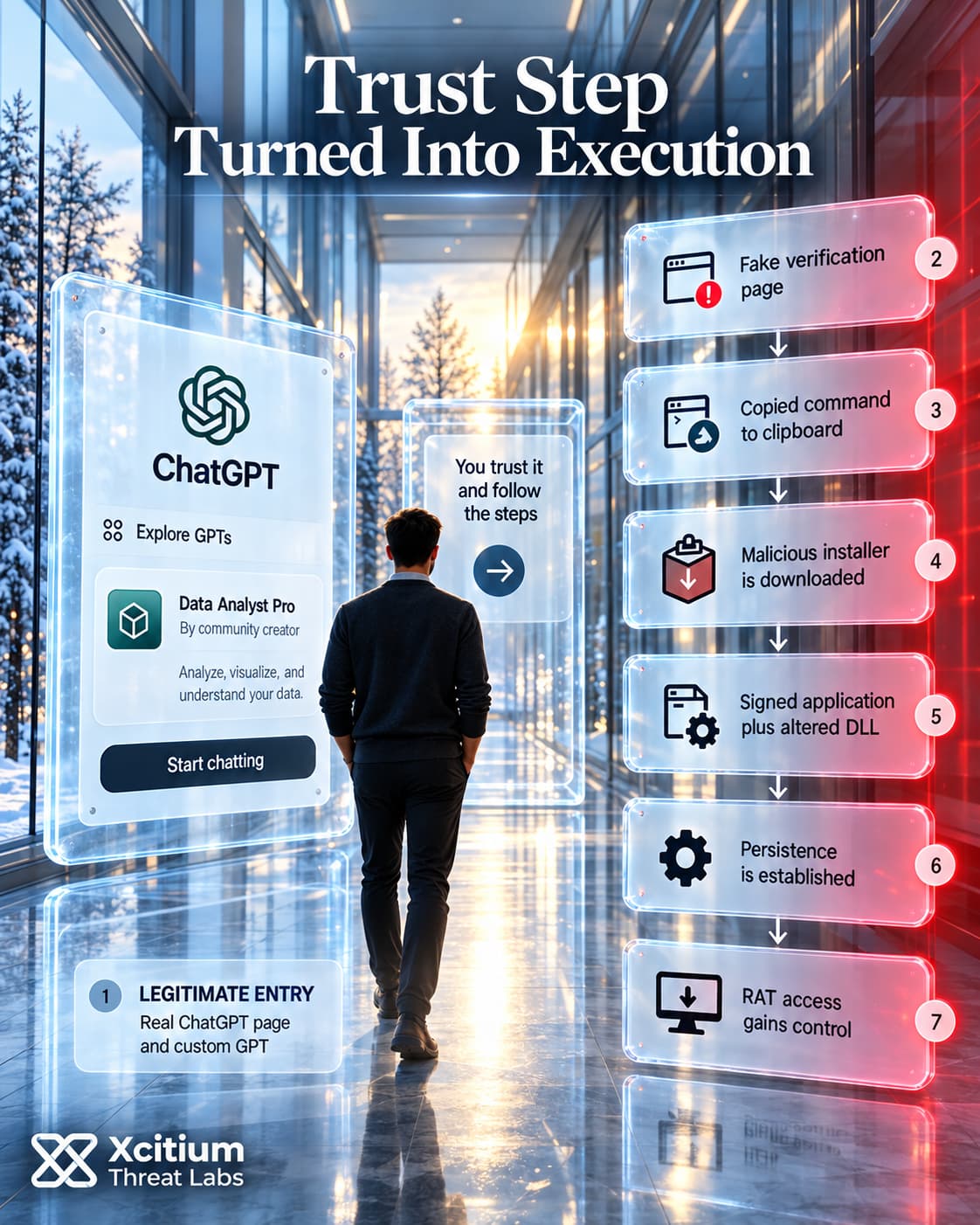
Attackers employed custom GPTs through the legitimate ChatGPT website to lure visitors into a malware attack on Windows systems. Paid Google results would direct users looking for ChatGPT into a chatbot named Plus 5.6, where its responses led to a fraudulent verification page that convinced them to execute the malicious command.
The malicious verification page hosted on Google Sites has been linked to at least 40 incidents. Nonetheless, just two of these have been confirmed with a custom GPT entry point. This difference restricts the significance of the number in terms of how relevant ChatGPT is to the whole attack.
What are custom GPT ClickFix attacks? Custom GPT ClickFix attacks involve the use of an attacker-configured chatbot leading users to a deceptive verification or troubleshooting page. From there, the page convinces the users to run a command on their system. Malware execution relies on this action locally, not just on the chatbot’s opening.
A Fake Service Notice Inside ChatGPT
The malicious GPT showed a legitimate-looking ChatGPT user interface because it was actually served from a legitimate OpenAI server. Its title seemed to be for a product but the builder tag revealed a community maker. The attacker provided the script behind its replies.
While users talked with the bot, it stated that the main service had low availability and proposed either a subscription plan or a backup way to visit the service from another URL. The latter led to a Google Sites page which faked a Cloudflare verification process.
Here the visitor was asked to copy a command into a local terminal. A discussion about the access to an online service turned into an action to execute some Windows-based software.
The legitimate domain increased the credibility of the message but did not make its author any more trustworthy. This is an abuse of a hosted function, the chain of events does not prove any compromise of the OpenAI infrastructure.
In our previous reports we analyzed the fake-verification delivery in WordlistLoader and SynkLoader Target Windows Credentials. This time, the custom-built GPT gave a good reason why the visitor should open the next page before the ClickFix prompt appeared.
A Signed Application Loads Altered Code
Once the victim executed the command, PowerShell fetched a script that deployed a malicious Windows installer package. This, in turn, initiated a legitimate application that had Canon’s digital signature. An altered library that was next to the legitimate application would deploy the malicious code via DLL sideloading.
There is a difference here. Although the legitimate Canon application was still signed properly, the altered logging library no longer had a signature. Thus, trusting the application does not necessarily mean trusting everything that it loads.
A separate component took care of extracting an encrypted loader from the .wav file and executing the decrypted code in memory. In other words, the .wav file acted as a carrier, while the encrypted archive contained the payload and persistence mechanism.
All of this meant that the malware execution was distributed among the components with different functions. There was an installer, signed application, .wav file and encrypted archive, each showing only part of the chain of execution.
Who Actually Controls a Custom GPT
Persistence Continued After Installer Quarantine
The malware provided Windows Registry Run key and a scheduled task. Both mechanisms were set to point back to the application that was loading the malicious payloads.
In at least one of the examined incidents, Microsoft Defender placed the installer in quarantine after it had already run. But the persistence keys stayed intact and kept the chain going. Removal of the delivery package did not mean removal of everything that installation created.
The implant verified the startup keys and re-created them if they were missing. So deletion of a key with the malware still running might only bring a temporary result. This aspect made the process state important for the cleanup, too.
Execution Governance is all about what the unknown code is able to perform during execution. And this issue is separate from whether any security product will detect this code later on. In this case, a notification about an installer and surviving startup keys are different security outcomes. A detection result in itself does not prove that an endpoint is no longer open to the attacker.
Remote Access Extended Beyond File Theft
The final payload was a remote access trojan, or RAT. Some of the capabilities of the payload as analyzed are desktop control, screen viewing, capturing via microphone and camera, and searching of files locally. This payload could also scan the machine and launch additional payloads.
These capabilities would provide the intruder with many possibilities once they have gained access to the computer. File access will provide them with access to documents. Remote operation will enable them to use the computer remotely.
However, capability does not necessarily imply usage in all cases. Public reporting does not show that in each incident the operator made recordings or stole any specific amount of data. Nor is there any reason to read the incident count as a count of breached organizations.
A Replacement GPT Delivered The Same RAT
By September 25, OpenAI had already removed the first GPT. A new GPT tied to the same operation appeared in the investigation on September 27. The new GPT came with some changes to the Windows delivery chain.
In contrast to the previous one that used a Canon application, this variant featured a signed Stardock executable and a patched accompanying library. While the loader changed from an audio carrier to a tampered Microsoft NuGet package, the same final RAT showed up in both cases.
The page’s later status needs its own date. Help Net Security reviewed the second GPT on September 29. The page was still up, but no longer pointing to the malicious ClickFix page. This note refers to the redirect change only, not to whether Windows systems infected before still carry the malware.
Conclusion: The Domain Was Real. The Instruction Was Not Trusted.
This campaign shows why a legitimate platform should not automatically make every instruction delivered through it trustworthy. Victims reached a real ChatGPT page and interacted with a real Custom GPT feature, but the GPT itself had been configured by an attacker. Its purpose was to provide a credible reason for sending the user to a fake verification page where the actual compromise began.
The decisive action still happened on the Windows endpoint. The victim was instructed to run a command that downloaded a malicious installer. From there, the chain used signed applications for DLL sideloading, decrypted additional code in memory, established multiple persistence mechanisms, and ultimately deployed a remote access trojan capable of controlling the machine and launching further payloads.
The campaign therefore combines two forms of borrowed trust. The first is platform trust: a page hosted on a legitimate service appears safer because of where it lives. The second is binary trust: a properly signed application appears legitimate even while it loads an altered, unsigned component beside it. Neither relationship should be treated as authorization for everything that follows.
Why This Threat Matters
- A legitimate domain does not validate the author. Attacker-controlled content can exist inside an otherwise trusted hosted platform.
- The chatbot was the pretext, not the payload. Malware execution still required a local command to be executed.
- Signed applications can carry untrusted code indirectly. DLL sideloading let legitimate executables participate in the malicious chain.
- Detection after installation may be too late. In one investigated case, the installer was quarantined after persistence had already been created.
- Removing the initial package does not prove recovery. Scheduled tasks, Run keys, and self-repairing persistence can survive the delivery artifact.
Where Defensive Control Must Operate
Xcitium Advanced EDR, powered by Xcitium’s patented Zero-Dwell platform, addresses the endpoint execution chain from the initial installer through DLL sideloading, persistence, and RAT activity.
Execution Governance adds the earlier trust decision by restricting what unknown code is permitted to change, launch, or access when it first executes.
Trust the Action, Not the Interface
Organizations should treat instructions that cross from a browser or AI assistant into local command execution as a high-risk boundary. A familiar domain, polished interface, or signed host application should not grant downstream code automatic trust. The strongest intervention point is before the first unknown command or component is allowed to turn a convincing support message into persistent endpoint access.