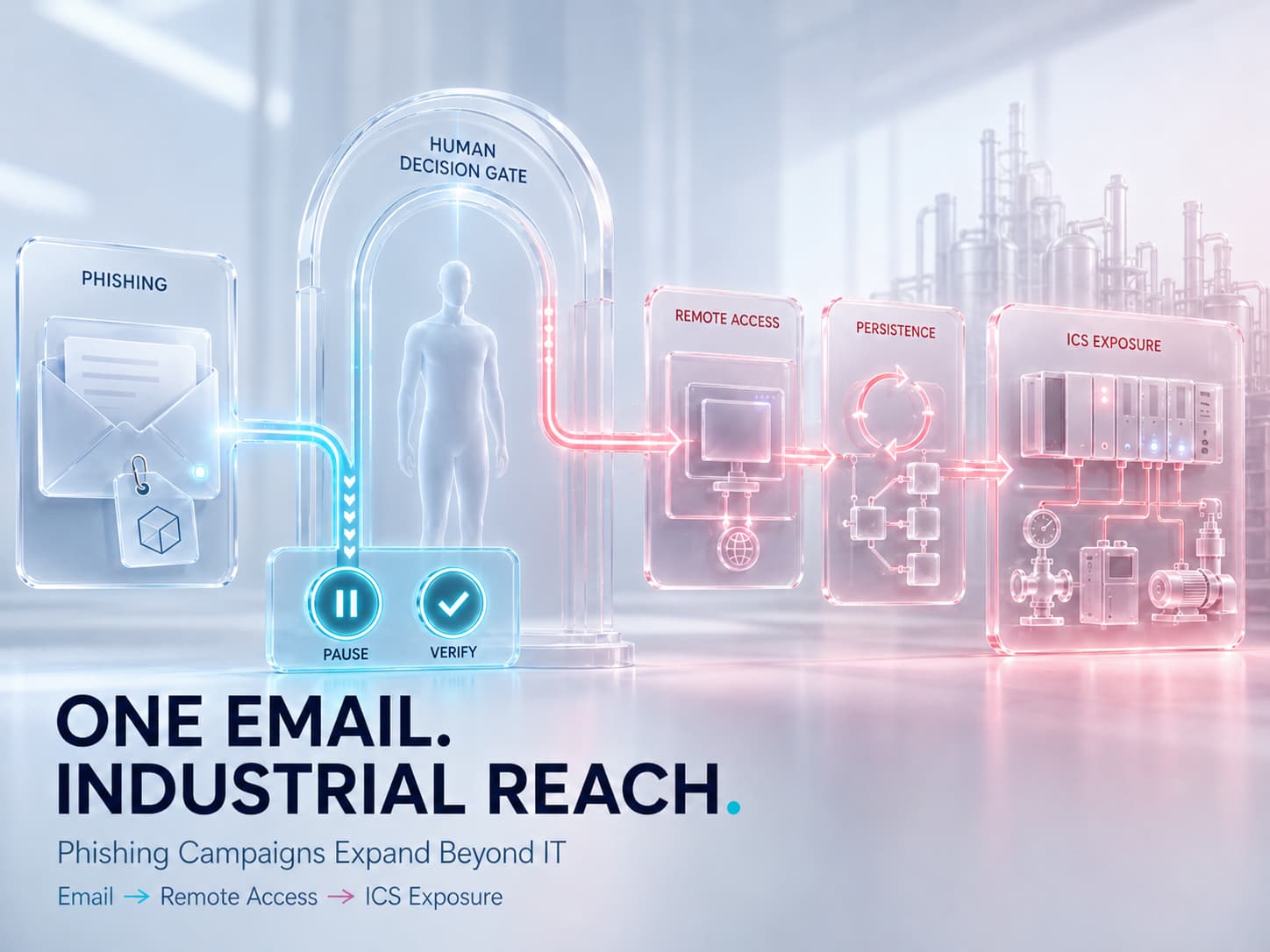
Modern campaigns consist of social engineering, legitimate management software exploits, and targeting of industrial infrastructures to create maximum damage.
Phishing remains a popular method of infiltrating a network; however, modern attacks reveal a trend toward using remote administration tool exploits and attacking operational technology infrastructure. Thus, companies have to deal with many more dangers than just stolen credentials.
Why Modern Phishing Campaigns Are Becoming More Sophisticated
Phishing attacks no longer depend on malicious attachment or imitation log-in web pages but have evolved into using well-thought-out lures that trick users.
Latest campaign includes invitation-type emails which at first glance seem harmless. Unlike those which pressure recipients into acting right away, these types of emails tell the recipients to open the attachment using their desktop devices. This is a critical part since the hackers may need desktops for installing a program that will enable deeper access to the computer system.
It means that the phishing email is just a part of a whole attack chain where the ultimate aim is to make users install programs remotely accessing their systems.
This strategy works effectively since the whole process seems legitimate.
How Legitimate Remote Management Tools Can Be Abused
Modern phishing involves elaborate methods of influence that go beyond malicious attachments or fake login pages.
The invitations in such emails appear harmless but instruct recipients to open their content in desktop mode. Attackers prefer desktop mode since it allows them to deploy software that will have a higher degree of system-level access.
Therefore, the email is merely the initial stage of an attack process whose end-game is getting the user to install software allowing remote access. The success rate is improved due to the legitimacy of such interactions and lack of common phishing signs.
Remotely Monitoring and Managing (RMM) software plays an important part in managing networks and troubleshooting issues. Nevertheless, more attackers use RMM applications to obtain remote access by abusing their credentials and functionality.
Recent attacks involve deploying files mimicking legitimate remote access applications. As a result, once executed, such applications create a connection to the compromised device for the attacker.
Some of the purposes of such malicious actions include:
- Remote access
- Persistence
- Remote command execution
- Information gathering
- Additional payload deployment
- Preparation of ransomware
Thus, organizations need to verify both the file’s malicious nature and its legitimate purpose.
The Hidden Activities That Occur After Initial Access
Though users believe that once the file has been downloaded, the threat is over, the threat usually comes after the installation process is done. Malicious actors carry out various operations in the background such as:
- Privilege escalation
- Registry modifications
- File substitutions
- System reconnaissance
- Gathering browser information
- Hardware information gathering
- Command execution
In addition, they collect information about the storage devices, operating system configuration, and networking resources to identify critical targets for their activities.
Since all this happens in the background, it becomes difficult to know about the breach.
Why Industrial Control Systems Are Facing Increased Attention
Threat actors are focusing on OT systems in addition to enterprise networks. ICS and PLCs are essential for energy, water, manufacturing, and government sectors.
Latest reports have indicated that there is continued interest in industrial devices available over the internet due to inadequate authentication or the presence of management interfaces that enable the system to connect directly to the device.
In case the devices are accessible, the threat actor gains access to:
- Configuration settings
- Project files
- HMIs
- SCADA systems
- Operational settings
Why Execution Governance Matters Against RMM Abuse
With the example of the remote access operation described in the bulletin, it is evident that there is an emerging trend when legitimate software can pose significant risks even when used by unauthorized actors.
Execution Governance strategy would be helpful in such situations because instead of focusing solely on signatures and malware indicators, this strategy focuses on the capabilities of the software in terms of execution possibilities and conditions.
It will be particularly valuable in operations that exploit legitimate administration tools, since the main problem is posed by the unauthorized execution of these programs.
Conclusion: When an Invitation Becomes Ransomware
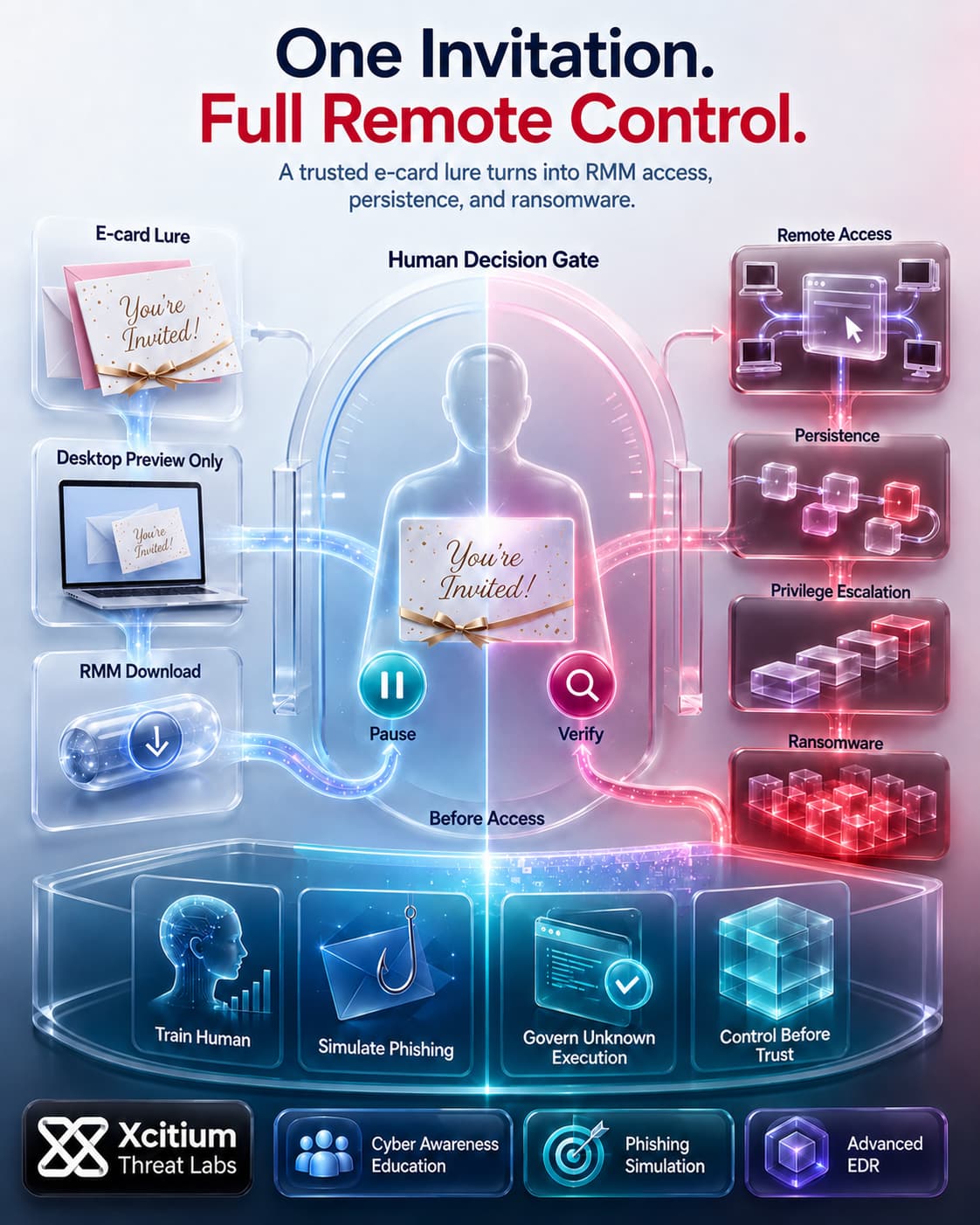
This campaign shows how modern ransomware attacks no longer need to begin with an obvious malicious attachment. A friendly e-card invitation, a trusted brand name, and a “desktop preview only” message are enough to move the victim from curiosity to execution. Once the renamed ScreenConnect installer runs, the attacker gains remote access, establishes persistence, deletes backups, and prepares the environment for encryption.
The attack succeeds because everything looks familiar until control is already lost.
Why This Threat Works So Well
This is a phishing-led ransomware chain built around trust, timing, and legitimate tooling.
- A real e-card brand makes the lure feel harmless
- A compromised sender account makes the email feel familiar
- “Desktop preview only” pushes the victim toward a Windows endpoint
- A ScreenConnect-themed site makes the download look like support software
- A signed RMM tool helps the attack blend into normal IT activity
- PowerShell, registry edits, reconnaissance, and backup deletion prepare the ransomware stage
By the time files are encrypted, the breach has already moved through multiple trusted steps.
Where Xcitium Changes the Outcome
This attack must be stopped at two points, before the user trusts the lure and before the payload can cause damage.
Xcitium Cyber Awareness Education and Phishing Simulation helps employees recognize fake invitations, desktop-only tricks, suspicious downloads, and impersonated support flows before they run the file.
Xcitium Advanced EDR, powered by Xcitium’s patented Zero-Dwell platform, applies Execution Governance when the file executes.
Unknown code does not receive unrestricted execution rights.
Code can run without being able to cause damage.
RMM abuse, PowerShell activity, persistence, backup deletion, and ransomware execution are stopped before impact.
This is Execution Governance in practice.
Control before trust. Enforcement before encryption.
Xcitium = No Ransomware
This campaign proves that ransomware can arrive disguised as something ordinary, an invitation, a preview, a trusted tool, or a familiar sender. Security cannot depend only on users recognizing the trick. It must also prevent execution from becoming damage.
Train users before they trust the lure.
Govern execution when the file runs.
Stop ransomware before encryption begins.
Choose Xcitium Cyber Awareness Education and Phishing Simulation to strengthen the human layer.
Choose Xcitium Advanced EDR to enforce Execution Governance and stop ransomware at execution.