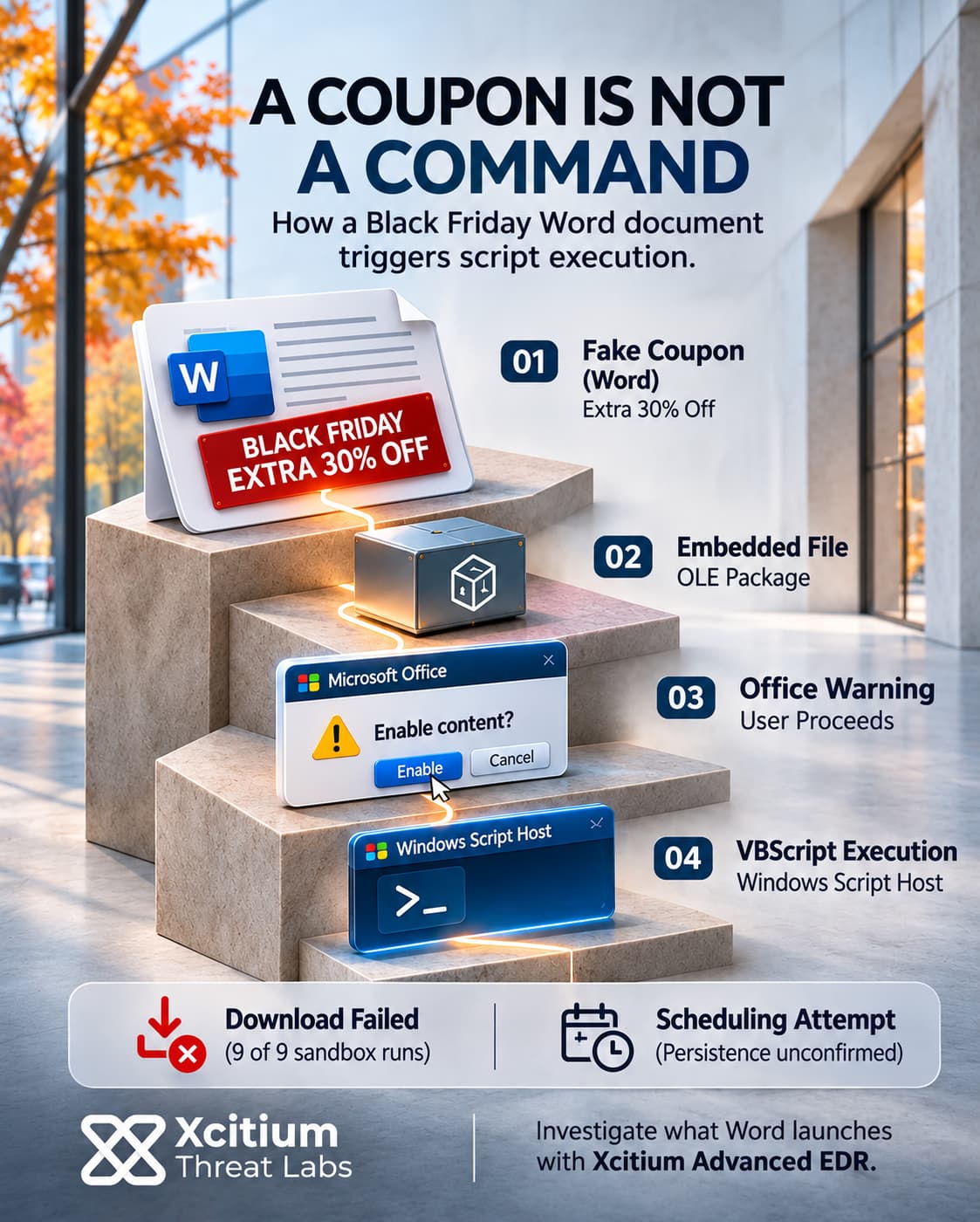
A fake Black Friday coupon promises an extra 30% off at familiar online retailers. The offer appears in a Word document with a button that seems to reveal a discount code. Instead, the button points to a file embedded inside the document. When someone opens that file and proceeds past an Office warning, Windows runs a VBScript.
The script tries to download a second executable and arrange for Windows to run it on a recurring schedule. However, the download fails in all nine documented sandbox runs. The coupon therefore shows local script execution and attempted persistence. Without the executable, the intended second stage remains unknown.
The Coupon Button Opens a File Inside Word
Word can carry an embedded file as part of a document. For example, a document can include a separate attachment and display an icon or other representation on the page. A visible label sets the reader’s expectation. The embedded object determines what the reader actually opens.
Here, an OLE package holds a script. The discount artwork and the button supply a reason to interact with that package. Opening the document brings up the offer. Windows receives the script after the reader opens the package and proceeds through the warning. That distinction puts the crucial decision after the first look at the document.
The case also shows why macro policy and embedded content deserve separate attention. Office macros run through the application’s macro engine. In this sample, Word hands an embedded file to a Windows interpreter. A review limited to the presence of macros can therefore miss the behavior that matters.
Windows Runs the Script Outside Word
The process trace starts with Word and continues into Windows Script Host, which interprets the script. Word provides the route to the object, while the interpreter performs the actions described by the script. As a result, the activity moves from displaying a document to running code under the Windows account.
After it starts, the script reaches out for a second file and tries to save it locally. It also invokes a Windows utility associated with Task Scheduler. A scheduled task can give a program another opportunity to start after the reader closes Word. In this case, the trace supports an attempt to set up that later launch.
For an incident responder, these events answer separate questions. A script-host process shows that execution reached Windows. The task utility shows that the script reached the scheduling step. By itself, either event leaves open whether the target file ever arrived or ran.
Nine Runs Show Where the Chain Stopped
The sample appeared in nine sandbox tasks from September 14 through October 5. All runs used Windows 7 and Word 2010, so the record describes that test environment. It leaves the scale of distribution and behavior on other Office configurations unresolved.
Every run hit the same limit. Windows Script Host reported that it could not find the requested resource. Consequently, the evidence ends before the second executable runs. It also leaves the executable’s malware family and purpose unknown.
A failed download still leaves evidence worth investigating. For example, a responder can correlate the original document with Word’s child process and the outbound request. Task records can then show whether Windows registered an entry, while separate file and process evidence can establish whether anything was available to run. Together, those checks give a clearer account of what happened on the device than the download error alone.
What to Watch for on Black Friday
An offer that arrives by email, text or ad is easier to check through the retailer’s official site or app. If a coupon asks someone to open an embedded file or approve an Office warning, the safer move is to stop and look for the offer through that separate route. Likewise, a message requesting a delivery fee deserves a check in the order history or carrier’s app before anyone enters payment details. On work devices, employees can report the original message and say whether they opened the file or accepted a prompt. We covered a separate seasonal lure that uses fake discounts to request work software logins.
Conclusion: Follow the Script Beyond Word
The coupon puts a familiar shopping action in front of a decision about local code. A reader expects a discount after opening the embedded file. Instead, Windows starts a script. By the time the separate download fails, the workstation has already executed the first stage.
For a security team, the original message and the endpoint trace answer different questions. The message explains why someone interacted with the document. Process records show what Windows did after that choice. In this case, Word’s child process and the subsequent scheduling activity are the strongest starting points for a host review.
Why This Threat Matters
- The warning marks a change in activity. Opening the embedded object lets an apparent shopping document hand off work to Windows.
- The first stage has its own evidence. Even when a download fails, the script and the outbound request can leave records.
- Scheduling and execution need separate checks. A task entry describes work Windows can run later, provided that its target is available.
Where Defensive Control Must Operate
Xcitium Advanced EDR, powered by Xcitium’s patented Zero-Dwell platform, gives teams endpoint telemetry to investigate suspicious process activity on managed Windows devices. For example, teams can review what Word launched and correlate that event with other endpoint activity from the same period.
Xcitium Cyber Awareness Education helps employees recognize suspicious offers and report unexpected requests to open a file. Phishing Simulation can then test whether staff report a realistic coupon message before following its attachment prompt.
Ask What Happened After the Prompt
If someone reports accepting the prompt on a work device, capture the time and the device name with the original message. Then check whether Word started a script host and whether a task appeared around the same time. Keep the download result separate in the incident record so the team can tell which stages actually occurred.